

Preserve Rankings Before You Redesign Your Website
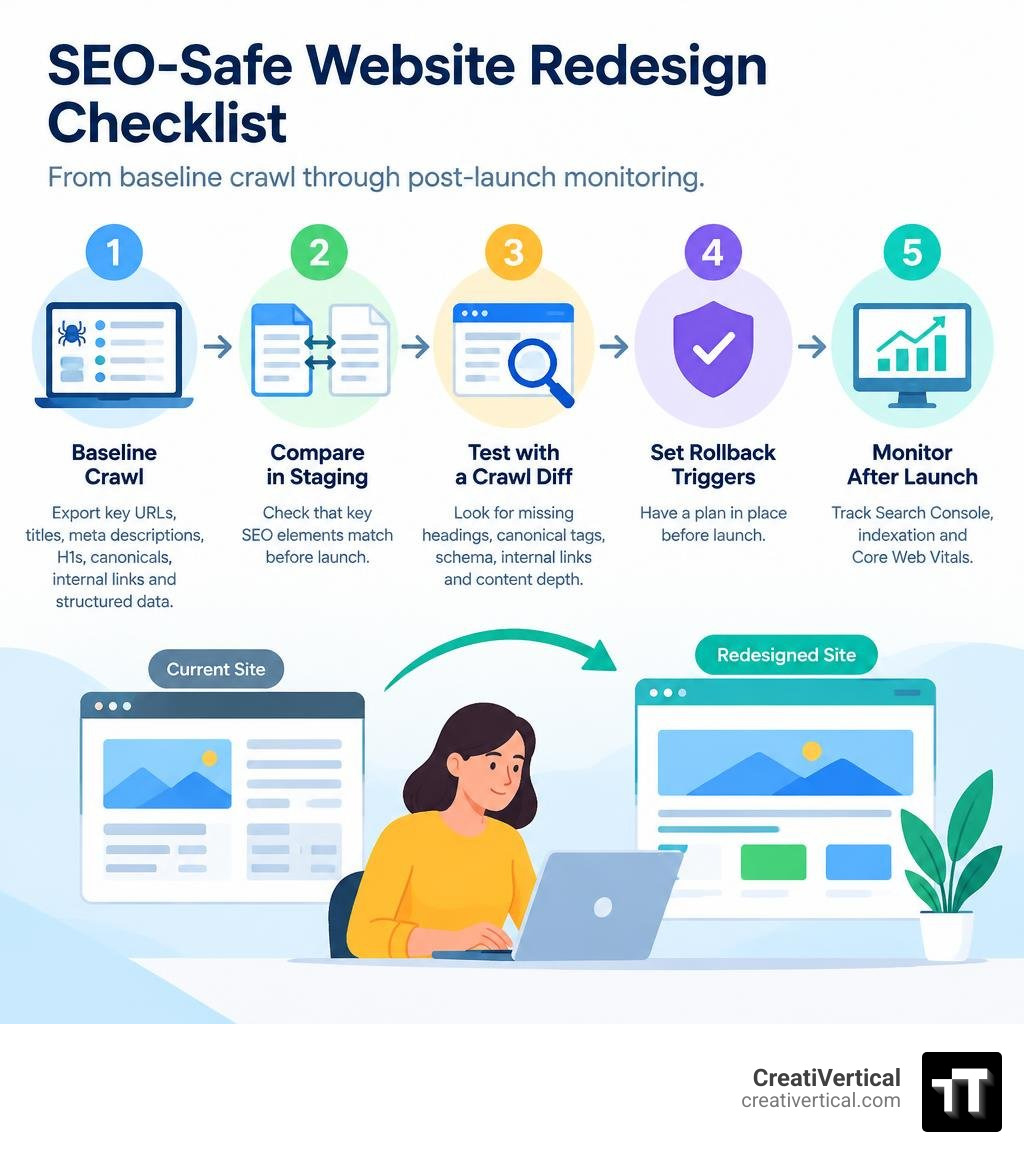
The safest approach to SEO and website redesign is simple: treat the new site as a controlled replacement, not a visual surprise. Before development starts, crawl and export the live site’s URLs, titles, meta descriptions, H1s, canonicals, internal links, and structured data. Then compare those fields against staging before launch.
- Keep high-value URLs unchanged whenever possible.
- Preserve the page content and on-page signals that already earn rankings.
- Test staging with a crawl diff, not only a visual review.
- Set rollback triggers before launch, then monitor Search Console, indexation, and Core Web Vitals closely.
A redesign can affect rankings even when no URL changes. New templates can silently remove headings, canonical tags, schema, internal links, or content depth. Google has also noted that redesigns may create more search fluctuation than a straightforward domain move because so many page-level signals can change at once.
For B2B brands, this matters most on pages that support long sales cycles: technical product pages, service pages, compliance resources, and pages with strong backlinks. Protect what already works first. Improve it in deliberate phases after the relaunch.
I’m Nicholas Cunha, founder of CreatiVertical, a family-run Kansas City agency with more than 20 years of web, SEO, and digital project experience across institutional, offshore, industrial, and B2B organizations. In this guide to SEO and website redesign, I’ll show you how to protect established search value while building a site that is easier to use, faster to load, and ready for future growth.
Explore more about seo and website redesign:
Redesign vs Migration: The Critical Scope Distinction
Every site overhaul begins with a single tripwire question: Did any URL change?
Getting the answer wrong invalidates your entire technical checklist. If every URL stays identical, you are executing a template redesign. If even a single URL changes, moves to a subfolder, switches protocols, or transfers to a new domain or CMS architecture, you have introduced a site migration.
A migration demands server-level 301 redirect mapping, redirect hop minimization, link equity transfer validation, and legacy endpoint preservation. A pure redesign operates under a completely different risk profile: preserving on-page signal parity across identical URLs. Following a migration checklist during a same-URL redesign often causes teams to focus exclusively on status codes while completely overlooking broken document object models (DOM), stripped schema markup, or diluted internal link graphs.
The Same-URL Redesign Tripwire and Algorithmic Volatility
Many marketing leaders assume a same-URL redesign carries far lower risk than moving domains. Search engine representatives, including Google’s John Mueller, have pointed out the opposite: a complete visual and template overhaul can trigger more search visibility fluctuation than a simple domain change.
When a domain moves with its design intact, search engines re-map existing ranking signals to the new destination. But when page templates, content layouts, DOM structures, heading hierarchies, and internal link paths change simultaneously on the same URL, search algorithms must re-evaluate the relevance and semantic weight of every single page.
Even technically clean launches commonly trigger short-term organic fluctuations during the initial re-indexing phase. Poorly planned launches—where templates strip key contextual signals—frequently result in sustained visibility losses that can take a year or more to recover. Managing risk means establishing rigid technical baselines before a single line of frontend code is written.
Phase-by-Phase Framework for SEO and Website Redesign
Protecting search equity during a redesign requires a systematic, phased framework. B2B organizations in specialized sectors—such as industrial manufacturing, offshore corporate services, and government contracting—rely heavily on search visibility for qualified inbound leads. Treating SEO as a downstream QA step invites disaster. It must run parallel to design and development.
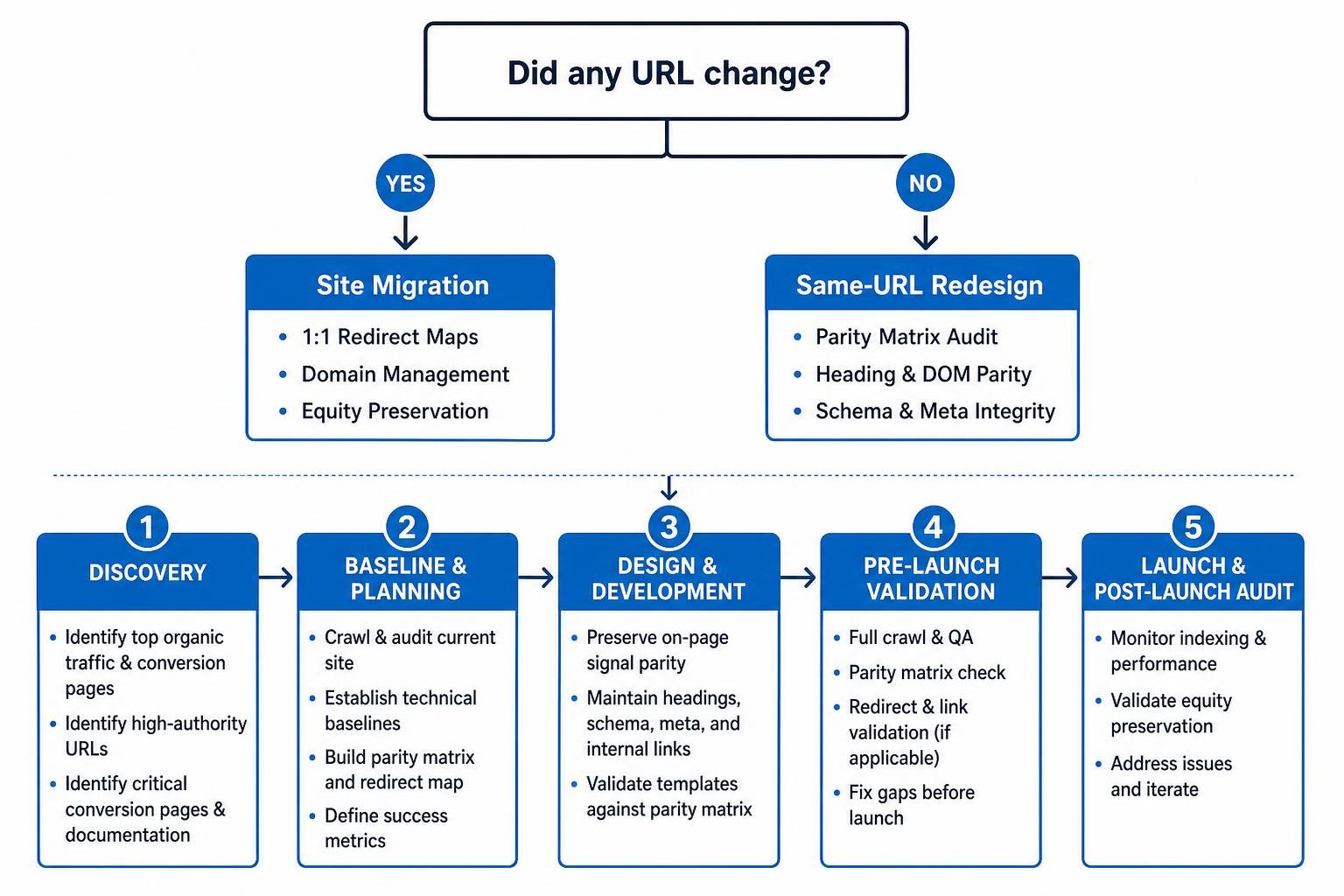
Discovery begins by identifying your highest-equity assets. Using Google Search Console, Google Analytics, and backlink audit exports, identify:
- Pages driving the top 20% of organic traffic and conversions.
- High-authority URLs holding the most referring domains.
- Critical conversion landing pages and deep technical documentation.
Before approving structural changes, perform a painless backlink profile audit to ensure inbound link equity is fully accounted for across every core template.
Phase 1 Baseline Crawl: Protecting Rankings in SEO and Website Redesign
Before modifying staging environments, capture a complete, immutable snapshot of your live production website using a desktop crawler like Screaming Frog or Sitebulb. This “Phase 1 Baseline” serves as the single source of truth against which all staging builds are measured.
Your baseline export must document:
- Exact URL structures and canonical configurations.
- Title tags and meta descriptions.
- Full heading structures (H1, H2, H3) and raw word counts.
- Server-side rendered JSON-LD structured data.
- Internal link inlinks, outlinks, and anchor text distributions.
- Server response codes, directive tags, and image alt text.
Capturing these elements upfront prevents subjective disputes during development and forms the foundation for maintaining SEO rankings during a site redesign.
The Redesign Parity Matrix and On-Page Protection
The Redesign Parity Matrix translates baseline crawl data into an actionable staging QA scorecard. Template redesigns frequently drop essential SEO elements through automated CMS components, visual minimalism, or improper JavaScript rendering.
| On-Page Element | Baseline (Live Site) | Staging Template | Crawl-Diff Verification Method | Action Required if Parity Fails |
|---|---|---|---|---|
| Title Tag | Exact target keyword match + brand | Truncated or generic site title | Screaming Frog HTML Diff (Field-level comparison) | Re-map dynamic CMS title formulas |
| H1 & Headings | Single descriptive H1; logical H2/H3s | Multiple H1s or styling-driven spans | DOM comparison crawl | Enforce strict single-H1 template markup |
| Content Depth | 1,800 words technical copy | 600 words collapsed in JS tabs | Rendered HTML word-count delta (>15% drop) | Restore core technical body copy |
| Structured Data | Comprehensive Organization / Service schema | Missing or broken client-side schema | Rich Results validation & raw HTML crawl | Implement server-side rendered JSON-LD |
| Internal Links | Contextual in-content anchor links | Replaced by generic icon navigation | Inlink count extraction diff | Restore contextual anchor links within body text |
| Canonical Tags | Self-referential absolute URLs | Hardcoded staging domain URLs | Automated regex crawl verification | Dynamically point to absolute production URLs |
A field-level crawl diff comparing staging directly against your Phase 1 baseline will instantly flag silent regressions before code reaches production servers.
Technical QA: Staging Environments and Template Swaps
Visual QA passes confirm whether a site looks appealing, but they cannot tell you if search crawlers can parse and index your content. Technical staging audits require running a rendered crawl of staging and performing automated field-by-field diffs against the live baseline.

Template swaps often introduce silent failures:
- JavaScript-dependent metadata: Schema and meta tags injected purely client-side via JavaScript can be delayed or missed during search engine rendering passes. Ensure all critical metadata renders in the server-side raw HTML.
- Stripped body copy: Modernizing a design often tempts designers to remove copy blocks in favor of whitespace. If a page ranks for competitive terms, cutting content depth by 40% will almost certainly harm its rankings.
- Internal link dilution: Moving from standard text links to dynamic hover menus or JavaScript widgets can sever the internal link graph, stranding deep category and service pages.
The Staging Indexation Trap: Noindex vs Robots.txt
Keeping pre-launch staging environments out of public search results is critical, but using the wrong method creates a dangerous trap.
Many development teams add a Disallow: / directive in robots.txt on staging and also place a tag in the template . This creates a major technical conflict. When a search crawler is blocked by robots.txt, it cannot fetch the page content—which means it never reads the noindex tag. If external sites, tools, or staging links leak, search engines can still index the staging URLs as bare snippets based solely on link signals.
The proper staging protocol:
- Primary Security: Restrict the staging environment behind HTTP Basic Authentication or IP allowlists.
- Indexation Safeguard: Use an HTTP header response directive:
X-Robots-Tag: noindex, nofollow. - Robots.txt: Keep
robots.txtopen to internal testing tools while authentication is active, ensuring headers can be parsed cleanly.
Resolving Core Web Vitals and LCP Errors During SEO and Website Redesign
Design overhauls often inadvertently degrade Core Web Vitals (CWV), introducing poor Largest Contentful Paint (LCP), high Cumulative Layout Shift (CLS), or sluggish Interaction to Next Paint (INP).
A frequent performance mistake in modern website redesigns is adding loading="lazy" across all images via global CMS settings. Never lazy-load the hero image or primary LCP element.
Lazy-loading the hero image delays its download until the browser parses layout coordinates and executes scroll calculations. According to official performance documentation on optimizing LCP on web.dev, the primary above-the-fold visual asset should be prioritized using the fetchpriority="high" attribute and preloaded where appropriate:
- Implement
in the document. - Apply
font-display: swapand preload critical custom web fonts to prevent layout shifts. - Minimize large JavaScript execution chains that block the main thread and harm INP.
Optimizing asset delivery ensures that visual modernizations align with technical performance benchmarks. For actionable techniques on refining template speed, review our practical guide on how to improve a website.
Launch Day Protocol, Crawl Diffs, and Rollback Thresholds
Launch day requires a disciplined, step-by-step deployment sequence rather than an informal push to production.
- Deploy Production Code: Execute the template swap or DNS migration during off-peak traffic hours.
- Remove Staging Safeguards: Instantly verify that
X-Robots-Tag: noindex, stagingrobots.txtblocks, and authentication prompts are completely removed from production. - Execute Live Crawl Diff: Run an automated production crawl immediately and compare it against the Phase 1 Baseline.
- Inspect Critical Endpoints: Use the Google Search Console URL Inspection tool on the top 20 business-critical URLs to verify rendered HTML, canonical tags, and structured data.
- Resubmit XML Sitemaps: Submit refreshed XML sitemaps in Google Search Console and trigger Bing IndexNow pings for rapid crawl discovery.

Setting Pre-Defined Rollback Tripwires vs Launch Noise
Day-one search volatility is normal. When templates change, search engines re-crawl, re-render, and recalculate quality signals. Minor ranking shifts during the first 14 days represent expected algorithmic noise.
However, a technical failure requires an immediate, pre-defined rollback plan rather than weeks of debate. Define your rollback thresholds before deployment:
- Trigger 1 (Indexation Block): Staging
noindexdirectives or restrictiverobots.txtrules accidentally deploy to production and remain active for more than two hours post-launch. - Trigger 2 (Widespread On-Page Failure): The immediate post-launch crawl diff reveals that more than 10% of high-equity URLs have missing canonicals, stripped title tags, or dropped structured data that cannot be patched via hotfix within four hours.
- Trigger 3 (Catastrophic Traffic Drop): Organic clicks to protected high-value landing pages drop by more than 40% over seven consecutive days, accompanied by crawl logs showing widespread server errors (5xx) or rendering drop-offs.
If a rollback threshold is breached, restore the pre-launch Phase 1 backup immediately, resolve the template defects on staging, and reschedule the launch.
The 90-Day Post-Launch Monitoring Window
Post-launch SEO oversight spans well beyond the initial 48 hours. A complete monitoring lifecycle requires 90 days of structured performance tracking:
- Days 1–14 (Crawl and Indexing Health): Monitor Google Search Console Coverage reports daily for sudden 404 spikes, redirect loops, or “Excluded by noindex” warnings. Track server logs to ensure Googlebot can fetch updated CSS and JavaScript assets without encountering 500 errors.
- Days 15–45 (Algorithmic Recalculation): Watch keyword ranking distributions for primary and secondary commercial terms. Expect minor adjustments, but watch for systematic drops across entire page templates.
- Days 46–90 (Stabilization and Optimization): Review Core Web Vitals field data in Search Console as real-user metrics populate. Compare conversion rates and engagement metrics against pre-launch baselines.
For businesses navigating complex search updates during site transitions, implementing adaptive SEO services provides the proactive technical adjustments needed to sustain organic momentum.
Frequently Asked Questions About Redesign SEO
How long does organic traffic take to recover after a website redesign?
Following a technically clean launch on a small-to-medium site, partial recovery and stabilization typically occur within 2 to 4 weeks. Full organic traffic stabilization and growth across competitive categories generally take between 2 to 6 months as search engines re-index updated page templates and recalculate internal equity distribution.
Why did my rankings drop after a same-URL template redesign?
Rankings drop after same-URL redesigns when underlying HTML changes disrupt search signals. Common causes include:
- Dropping keyword-rich subheadings (H2/H3) or reducing body text depth.
- Stripping schema markup or converting server-rendered markup into client-side JavaScript.
- Altering the internal linking graph by removing footer, sidebar, or contextual in-text links.
- Slower page loading speeds and worsening Core Web Vitals (such as delayed LCP or layout shifts).
Can content pruning be done simultaneously with a visual redesign?
Executing large-scale content pruning alongside a visual template redesign introduces multivariate risk. If search traffic declines, isolating whether the drop was caused by template changes, stripped on-page signals, or the removal of supporting content becomes exceedingly difficult.
The safest strategy is phased execution:
- Launch the template redesign with full content parity.
- Allow search engines to stabilize rankings over 60 to 90 days.
- Execute data-driven content pruning, consolidations, and 301 redirects as a separate, controlled initiative.
Conclusion: Executing an SEO-Safe Site Relaunch
A successful website redesign should elevate your brand, modernize user experience, and accelerate conversions without compromising the hard-earned search equity that powers your pipeline. Search engines rank individual documents based on granular technical and contextual signals; treating a redesign purely as an aesthetic update is the most common reason businesses experience catastrophic traffic drops.
By running thorough baseline crawls, enforcing content and markup parity through structured matrices, avoiding staging indexation traps, and setting firm rollback thresholds, B2B organizations can reliably navigate site redesigns while preserving their organic footprint.
At CreatiVertical, we operate as an ongoing digital partner for B2B manufacturers, government-facing technology vendors, offshore professional firms, and local enterprises throughout the Kansas City region. We build and maintain high-performance digital systems that combine modern web design, search optimization, and AI visibility.
When your organization is ready to modernize its digital presence safely, explore our custom website development services to ensure your next site build launches smoothly, performs reliably, and protects your bottom line.