

Why Site Redesign SEO is Critical for B2B Performance
Site redesign SEO is the practice of protecting — and ideally improving — your organic search rankings while rebuilding or relaunching your website. Done right, it’s nearly invisible to Google. Done wrong, it can erase years of ranking progress in a matter of days.
Here’s what you need to know at a glance:
- Keep your URLs — if a URL must change, set up a 301 redirect to the closest equivalent page
- Preserve your metadata — page titles, H1 tags, and meta descriptions carry ranking signals that get lost in migrations
- Audit before you build — document your top-performing pages, keywords, and backlinks before touching anything
- Test on staging first — never let Google crawl your redesign until it’s ready
- Monitor after launch — check Google Search Console daily for the first two weeks
Traffic losses after a redesign aren’t inevitable, but they are common. Mismanaged rebuilds routinely cause organic traffic drops of 20–50% or more — and recovery can take months, sometimes longer. The root cause is almost never the new design itself. It’s what changes underneath: URLs, metadata, redirect logic, internal links, and the technical signals Google uses to rank individual pages.
This guide walks you through every phase of a safe redesign — from pre-launch audits to post-launch recovery — so you can ship a better site without sacrificing the search equity you’ve earned.
I’m Nicholas Cunha, founder of CreatiVertical, a Kansas City-based digital agency with over twenty years of hands-on experience in web development, SEO, and applied AI — including complex site redesign seo migrations for government institutions, offshore professional-services firms, and B2B manufacturers. I’ve managed redesigns where preserving search visibility was non-negotiable, and the process I’ll share here reflects what actually works in production, not just in theory.
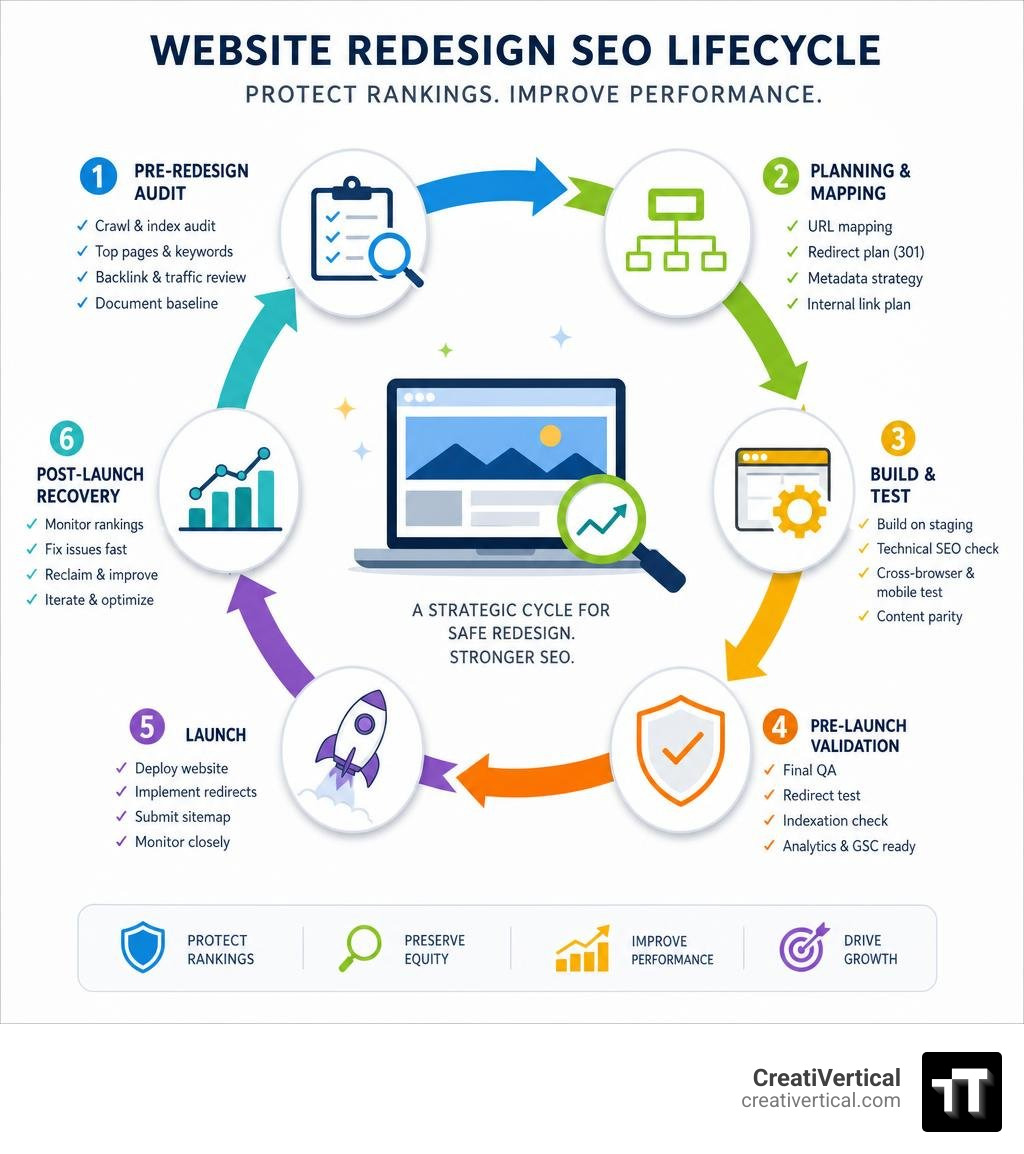
When a business decides to overhaul its digital presence, the primary drivers are usually aesthetic or functional: a refreshed brand identity, a better content management system, or an improved mobile layout. However, treating a redesign strictly as a visual project is one of the most expensive mistakes an organization can make.
Without a strategic focus on site redesign seo, your search visibility can plummet overnight. A mismanaged redesign can cause organic traffic drops of 20–50% — sometimes more — which directly affects your B2B lead generation, online conversions, and overall revenue.
Search engines do not rank websites as whole units; they rank individual pages based on a delicate web of signals, including historical performance, keyword relevance, internal linking structures, and backlink equity. If you change a page’s URL, remove high-performing copy, or break its internal links, Google treats it as a brand-new page with zero history.
Because only 0.63% of Google searchers click on results from the second page, dropping from the first page of search results can completely cut off your inbound pipeline. Integrating technical SEO experts at the very beginning of your project ensures that search engines understand your new site architecture immediately, keeping any temporary traffic fluctuations minimal and highly manageable.
To learn more about how visual changes and technical elements interact, you can read this comprehensive Website Redesign SEO Guide – How to Keep Your Rankings – Repaint.
Phase 1: Pre-Redesign Audits and Establishing Baseline Metrics
Before your design team opens Figma or your developers write a single line of code, you must establish an absolute baseline of your current website’s performance. If you do not document what is currently working, you are essentially flying blind, risking the accidental deletion of the very assets driving your organic success.
Auditing Your Current Site Architecture and Assets
The first step is running a comprehensive crawl of your existing live website. We recommend using industry-standard tools like Screaming Frog or Sitebulb to map out every single live URL, redirect, canonical tag, and structured data schema currently in use.
This crawl acts as your master inventory. It reveals:
- All active pages, including hidden landing pages and legacy blog posts.
- The exact structure of your XML sitemap.
- Current on-page elements (titles, meta descriptions, and heading structures).
- Existing technical issues, such as broken links or redirect loops, that must be resolved prior to migration.
For a deeper look into identifying opportunities for improvement during this phase, check out our guide on How to Improve a Website.
Capturing Baseline Performance Metrics Before the Build
Once you have your technical crawl, you must cross-reference it with real-world performance data. Pull at least 12 months of page-level data from Google Analytics (GA4) and Google Search Console to identify your highest-value assets.
In a typical B2B or professional services website, a small fraction of your pages — often just 20% — drives up to 80% of your organic traffic and conversions. You must isolate these high-performing pages for additional protection.
Document these key baseline metrics:
- Keyword Rankings: Track your primary and secondary keywords, their current positions, and the exact landing URLs ranking for them.
- Organic Traffic & Impressions: Note which pages receive the most traffic and search impressions.
- Backlink Profile: Identify which pages hold the most external link equity.
- Core Web Vitals & Page Speed: Measure your current Largest Contentful Paint (LCP), Interaction to Next Paint (INP), and Cumulative Layout Shift (CLS).
Page speed is not just a minor ranking factor; it directly impacts user retention and conversion rates. About 93% of users will leave a website if it takes too long to load, and a mere one-second improvement in load times can boost conversions by 7%.
Understanding these technical requirements early also helps you plan your overall project budget. For a realistic breakdown of what to expect, read our analysis on What Should a New Website Cost?.
Phase 2: URL Mapping and Redirect Strategy
If there is a single step in the site redesign seo process that determines success or failure, it is your redirect strategy. Changing your URL structure without a mapping plan is the most common cause of catastrophic ranking drops.

Creating a 1:1 Redirect Map to Protect Link Equity
Whenever possible, keep your existing URL structures identical. If your current URLs are clean, logical, and perform well, there is rarely a good reason to change them. However, if you are migrating to a new CMS, restructuring your service categories, or cleaning up messy dynamic parameters, URL changes may be unavoidable.
When a URL must change, you must implement a server-level 301 redirect. A 301 redirect tells search engine crawlers and users that a page has permanently moved to a new location, passing roughly 95–99% of the original page’s ranking power (link equity) to the new URL.
To manage this safely, build a 1:1 redirect matrix. This is a master spreadsheet that maps every single old URL to its exact new counterpart.
When building your matrix, watch out for trailing slash issues. For example, Google treats example.com/services and example.com/services/ as two entirely different pages. If your CMS configurations are inconsistent, you can accidentally create massive duplicate content issues or break your redirects entirely.
For a step-by-step breakdown of how to structure this process, refer to the Site redesign checklist to preserve SEO & improve visibility.
Avoiding Common Redirect Pitfalls in Site Redesign SEO
A lazy redirect strategy can destroy your search engine visibility just as quickly as having no redirects at all. Avoid these three common pitfalls:
- Redirecting Everything to the Homepage: If you have 100 old pages and you redirect them all to your new homepage, Google will treat those redirects as “Soft 404s.” You will lose the topical relevance of those individual pages, and your rankings will vanish. Always redirect old pages to the most relevant, contextually similar new page.
- Creating Redirect Chains: A redirect chain occurs when URL A points to URL B, which then points to URL C. These chains slow down page load times, waste your search engine crawl budget, and dilute link equity. Always ensure your redirects are direct, single-step jumps from the old URL to the final, active URL.
- Ignoring Backlinks: Your external backlinks are a primary signal of trust. If a high-authority site links to an old page on your site, and that page now returns a 404 error, you lose that trust instantly.
For highly technical migrations, ensuring clean server configurations and a solid technical foundation is essential. To understand how these advanced elements work together, read our dedicated resource on Technical SEO.

Phase 3: Preserving On-Page SEO and Content Assets
A common mistake during a website redesign is rewriting copy purely for the sake of a “modern look.” While a design refresh is an excellent opportunity to improve clarity and tone, stripping away high-performing copy can destroy the contextual signals Google uses to rank your pages.
Protecting High-Performing Content and Metadata
When migrating content, apply a strict “Keep, Kill, Consolidate, or Create” framework:
- Keep: High-performing pages should be migrated with their core content, H1 tags, and metadata completely intact. If a page ranks in position 3 for a highly competitive B2B term, do not alter its main headings or body copy during the launch phase.
- Kill: Outdated or completely irrelevant pages that receive zero traffic and have no backlinks can be safely deleted, but their URLs should be redirected to a relevant parent page.
- Consolidate: If you have multiple thin pages competing for the same keywords, merge them into a single, comprehensive pillar page to eliminate keyword cannibalization.
- Create: Build new content to fill gaps identified during your competitor analysis.
Ensure that your title tags (kept under 60 characters), meta descriptions (under 160 characters), and image alt texts are carefully preserved or optimized. For more context on how search engines evaluate content quality and helpfulness, read about Everything You Need to Know About Google’s New Algorithm Update.
Optimizing for AI Search Visibility and Entity-First SEO
The search landscape is changing rapidly. Modern SEO requires optimizing not just for traditional search engine result pages (SERPs), but also for AI search engines like ChatGPT, Claude, and Perplexity.
To ensure your redesigned website is easily cited by AI models, your content must be highly structured and semantically clear. AI models rely heavily on entities — real-world concepts, organizations, and products — and how they relate to one another.
To future-proof your site redesign:
- Use clean, simple HTML heading structures (H1, H2, H3) to help LLMs parse your content.
- Implement comprehensive schema markup (such as Organization, Product, LocalBusiness, or FAQ schema) to explicitly define your brand’s relationships and data.
- Provide direct, clear answers to common industry queries above the fold on your service pages.
To explore how to adapt your digital presence for this new era of search, read about our Adaptive SEO Services.
Phase 4: Technical SEO Safeguards and Staging QA
The build phase is where design and development come together. To prevent search engines from indexation errors or crawling issues, you must enforce strict technical safeguards.
Pre-Launch Testing in a Staging Environment
All development work must take place on a secure staging environment. This staging site must be completely hidden from search engine crawlers to prevent duplicate content issues.

Before you push the new site live, conduct a rigorous pre-launch QA checklist on your staging environment:
- Verify Indexing Directives: Ensure the staging site uses a
noindextag or is blocked viarobots.txtso Google doesn’t index it prematurely. However, you must have a plan to remove these directives immediately upon launch. - Check Canonical Tags: Verify that all canonical tags point to the final, production URLs (e.g.,
https://creativertical.com/page/) rather than the staging environment URLs (e.g.,https://staging.creativertical.com/page/). - Test Mobile Responsiveness: Since search engines operate on mobile-first indexing, your mobile layout must contain the exact same high-value content, structured data, and navigation as your desktop version.
- Review Core Web Vitals: Test the staging templates for loading speeds, layout shifts, and interactivity.
Executing a Safe Launch Day Protocol
On launch day, timing and precision are everything. We recommend launching during a period of low natural traffic (such as late evening or over a weekend) to minimize user disruption.
Once the DNS cutover is complete:
- Remove Noindex Directives: Immediately verify that your production
robots.txtfile and page headers allow crawling. A forgottenDisallow: /in your robots.txt can de-index your entire site within days. - Test Your Redirect Map: Run a crawl of your old URL list to verify that every single 301 redirect is working correctly and pointing to the proper new page.
- Submit Your New XML Sitemap: Upload your updated sitemap directly to Google Search Console to prompt immediate crawling of your new structure.
- Verify Search Console and Analytics: Ensure your tracking codes are fully active on the new templates.
If you are building or launching on WordPress, working with a team that understands platform-specific launch security is vital. Explore our specialized WordPress Web Design Kansas City services to see how we handle these technical transitions.
Phase 5: Post-Launch Monitoring and Recovery Timelines
Launching your website is not the final step. The first 30 to 60 days post-launch are critical for monitoring crawl behavior, resolving unexpected technical issues, and tracking search engine adjustment.
Tracking Key Performance Indicators Post-Launch
During the first two weeks, monitor Google Search Console and your analytics dashboards daily. Look closely for:
- Crawl Errors: Watch the “Indexing” or “Pages” report in GSC for sudden spikes in 404 errors, redirect errors, or canonical issues.
- Organic Impressions: Track search impressions. A steady or slightly fluctuating impression line indicates Google is successfully indexing the new pages.
- Indexation Status: Ensure the number of indexed pages matches your pre-redesign baseline.
For professional assistance in monitoring these post-launch signals, consider partnering with our team for ongoing SEO Services in Kansas City.
Managing the Recovery Timeline for Site Redesign SEO
Even with a flawless technical execution, a temporary traffic fluctuation of 10–20% is normal during the first 1 to 2 weeks after launch. Google must recrawl your pages, process the new redirect maps, and update its index.
For a well-managed site, rankings typically stabilize within 4 to 6 weeks, with organic performance often exceeding the original baseline by months 3 and 4 due to improved site speed, better mobile layout, and cleaner code.
| Metric / Scenario | Well-Managed Redesign SEO | Mismanaged Redesign SEO |
|---|---|---|
| Initial Traffic Change (Weeks 1-2) | 10% to 20% temporary dip | 30% to 80% drop |
| Recovery Timeline | 4 to 6 weeks to baseline | 6 to 12 months (or never) |
| 404 Errors Generated | Near zero | High (dozens or hundreds) |
| Link Equity Preservation | 95%+ preserved | Lost entirely on un-redirected pages |
| Long-Term Performance | Net improvement above baseline | Sustained loss of leads and revenue |
Frequently Asked Questions About Site Redesign SEO
How long does SEO recovery take after a website redesign?
For a standard B2B website with proper 301 redirects and preserved content, any temporary ranking fluctuations should stabilize within 4 to 6 weeks. Complete indexation of a new structure depends on your site’s overall authority and how frequently search engine bots crawl your pages. Within 3 to 4 months, a technically superior site should begin outperforming its old baseline.
Can I change my domain name during a website redesign?
Yes, but it adds substantial risk and complexity. Changing your domain name forces search engines to re-evaluate your entire brand’s authority from scratch. If you must change domains (due to a corporate rebrand or acquisition), expect a transition period of 12 to 18 months to fully rebuild and transfer your original domain authority. Whenever possible, we recommend keeping your existing domain.
Why did my organic traffic drop after launching a new site?
A post-launch traffic drop is almost always caused by one of four issues:
- Missing or Broken Redirects: Old URLs are returning 404 errors, breaking your backlink equity.
- Overwritten Metadata: High-performing title tags, H1s, or content blocks were deleted or replaced with unoptimized text.
- Indexation Blocks: The staging site’s
noindextag or restrictiverobots.txtfile was accidentally left active on the live production site. - Slow Page Speeds: Heavy, unoptimized code or uncompressed images are causing high bounce rates, triggering negative user-experience signals.
Conclusion
A website redesign should be an exciting milestone that fuels your business growth, not a technical disaster that resets your organic search traffic back to zero. By keeping SEO at the center of your design and development decisions from day one, you can protect your hard-earned rankings and set your new site up for long-term success.
At CreatiVertical, we operate as a dedicated digital growth partner for our clients, rather than a transactional vendor. Based in Lake Tapawingo, Missouri, we build complete, performance-focused digital systems that handle everything from custom development and technical SEO to branding and advanced AI search visibility.
Whether you are a local Kansas City business, an offshore professional services firm, an industrial B2B manufacturer, or a government-facing technology vendor, we provide the precise technical execution needed to protect your digital assets.
Ready to plan a safe, growth-focused website migration? Explore our Website Development services or contact us today to discuss your project.
To connect with our team or learn more about our local presence, visit our CreatiVertical – LinkedIn page or find our physical location on CreatiVertical, 154 Anchor Dr, Lake Tapawingo, MO 64015, US. If you are looking for broader regional design insights, you can also check out the Kansas City Web Design & SEO – LinkedIn group.