

Foundation Setup: Claiming, Verification, and Core Profile Data
Before you can optimize your profile for local search, you have to claim and verify ownership. Google needs to ensure that real, legitimate businesses represent physical locations or defined service boundaries.
To launch a profile, navigate to Get Listed on Google – Google Business Profile and sign in with a dedicated company email account rather than a personal address. If you’re building a local presence from scratch or taking over an existing listing, follow our Get started with Google Business Profile steps to establish clean administrative permissions.
Google divides local listings into two distinct structural models:
- Storefront Businesses: Physical premises where customers walk through the doors during stated business hours (e.g., retail stores, law firms, dental clinics, or auto repair shops).
- Service-Area Businesses (SABs): Companies where team members visit or deliver directly to clients (e.g., plumbers, mobile detailers, HVAC contractors, or home service specialists).
If you operate a service-area business from a home office or private facility, you must hide your physical street address and establish defined service areas by entering specific cities or zip codes. Service areas should generally remain within a reasonable boundary—typically capped at roughly a two-hour driving radius from your operational base. Attempting to blanket entire states on a single profile violates Google’s core guidelines and invites swift profile suspension.
Verification typically takes up to two weeks, depending on the method Google assigns to your account:
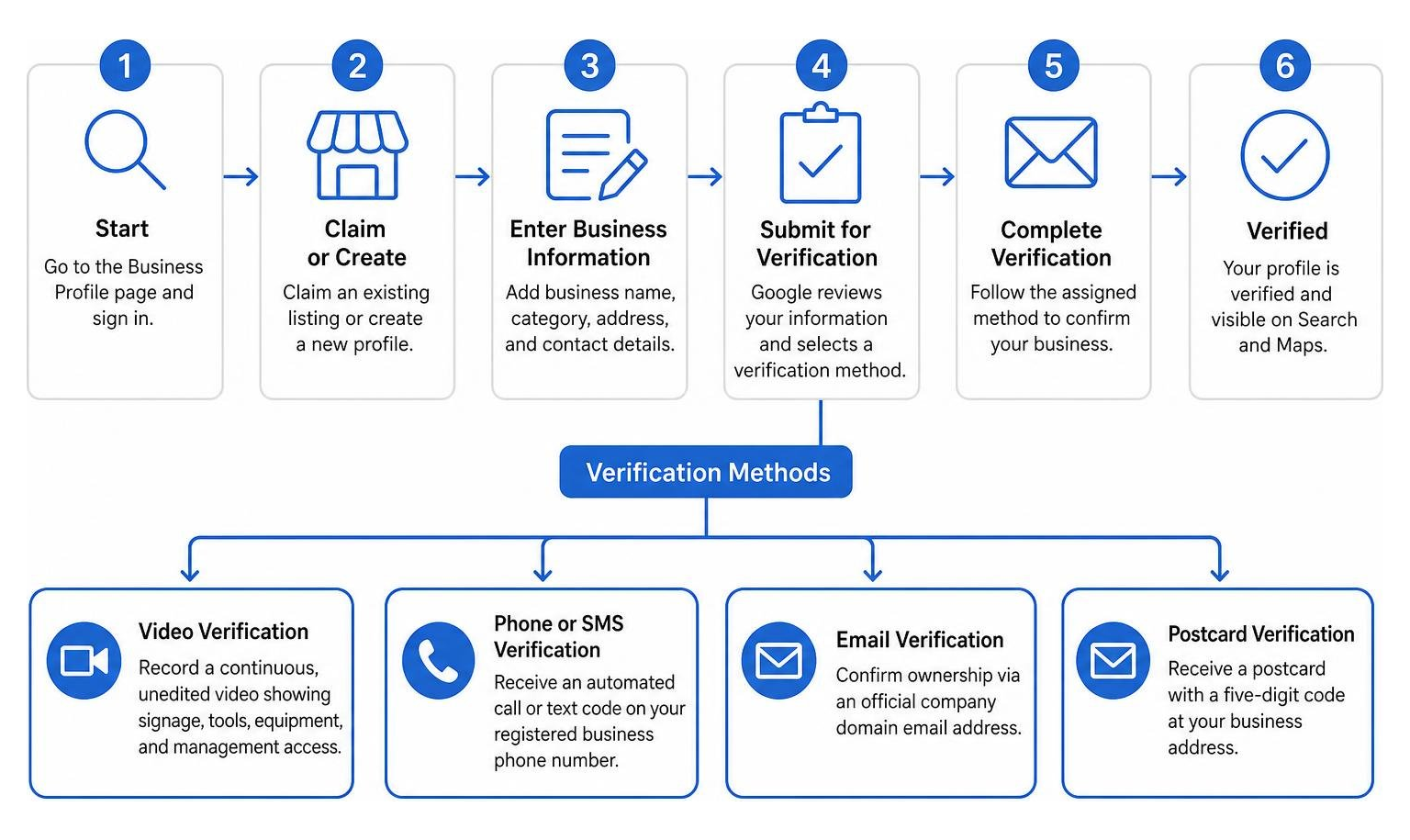
- Video Verification: Recording a continuous, unedited video demonstrating physical street signage, office tools, equipment, and proof of management access.
- Phone or SMS Verification: Receiving an automated call or text code on your registered business telephone number.
- Email Verification: Confirming ownership via an official company domain email address.
- Postcard Verification: Receiving a physical mailer containing a unique five-digit verification code at your physical business location.
A non-negotiable principle of local search foundation is NAP (Name, Address, Phone) consistency. Your business name, street address, and contact number listed on Google must match your real-world physical signage, tax filings, legal registrations, and web citations line for line. If you’re looking for a wider overview on building local prominence, consult our comprehensive step by step guide to local visibility online.
Primary and Secondary Category Selection
Category selection is one of the single most influential ranking factors in local SEO. Google provides over 2,000 specific business categories, and choosing the right combination signals exactly what user intent your listing matches.
- Primary Category: You can choose only one primary category. This choice carries immense weight in Google’s ranking algorithm. It should answer the question “What is your business?” rather than “What does your business have or sell?” For instance, if you operate an Italian restaurant that offers delivery, your primary category should be “Italian Restaurant,” not “Delivery Service.”
- Secondary Categories: You can assign up to 9 secondary categories. Use these to capture specialized departments, core sub-services, or secondary product lines. An insurance brokerage might set “Insurance Agency” as its primary classification, adding “Auto Insurance Agency,” “Homeowners Insurance Agency,” and “Life Insurance Agency” as secondary classifications.
Avoid the temptation to bloat your listing with loosely relevant categories. Selecting irrelevant categories dilutes your profile’s topical authority and confuses Google’s semantic indexing engine.
Core Information Formatting and Guidelines
Once primary categorization is secured, complete every standard data field within the dashboard. You can make updates directly on Google Search or Maps by following Google’s official guide to Edit your Business Profile – Google Business Profile Help.
Key guidelines for core profile details include:
- Business Name: Your listed name must strictly match your real-world operational name as seen on physical store signage, official stationery, and legal documentation. Never append promotional slogans, store numbers, geographic keywords, or legal identifiers like “LLC” or “Inc.” unless they appear on your physical signage.
- Business Description: You have up to 750 characters to describe your company’s history, mission, core offerings, and unique selling proposition. Keep descriptions clear, human, and professional. URLs, HTML code, sales pitches, and repetitive keyword stuffing are strictly prohibited in this field.
- Phone Settings: Supply a local direct phone number with a regional area code rather than an unmonitored call center helpline. If you prefer to route call traffic through tracking lines, set your primary tracking line as the primary phone number and add your primary local landline as a secondary phone number so Google can cross-verify citation signals. If necessary, you can toggle phone display settings to hide your number within Advanced Settings.
- Business Hours and Special Hours: Maintain accurate regular operating hours. For holidays, seasonal adjustments, or special events, use the “Special hours” feature to prevent customer frustration and protect your review sentiment.
Mastering Google Business Profile Management for Local Search Visibility

Achieving local search dominance requires understanding the three core pillars Google uses to evaluate local rankings: Relevance, Distance, and Prominence.

- Relevance: How well your profile details, categories, services, and attributes match the implicit intent behind a user’s search query.
- Distance: How close your physical address or service boundary is to the searcher’s geographical location or specified location keyword.
- Prominence: How established, well-reviewed, authoritative, and active your business is online compared to regional competitors.
While you cannot alter a searcher’s physical location, ongoing google business profile management directly amplifies your profile’s relevance and prominence. For a deeper breakdown of ranking mechanics, review our insights on how to rank for near me searches and win local customers.
High-Impact Visual Content and Google Posts
Active visual management directly converts casual browsers into direct customer leads. According to internal data from Google, profiles featuring updated photos receive 42% to 45% more direction requests and 31% to 35% more website clicks than profiles lacking visual media.
Implement a systematic visual content schedule:
- Authentic Storefront & Signage Photos: Upload high-resolution, unedited photos of your building exterior, entranceways, and parking areas to help customers identify your location in person.
- Interior & Workspace Media: Show clean, welcoming interior spaces, office layouts, specialized machinery, or production floors.
- Team & Action Shots: Feature your staff members delivering services, interacting with clients, or working on job sites. Avoid generic stock photos; Google’s visual recognition models prioritize original visual content.
- Google Posts: Treat Google Posts like an active micro-blogging channel directly inside search results. Publish regular promotional updates, seasonal offers, product highlights, or event announcements every 7 to 14 days. While posts remain visible in your update tab indefinitely, their promotional impact is strongest during the first few weeks. Include clear Call-To-Action buttons such as “Call Now,” “Book,” or “Learn More.”
Leveraging Attributes and Digital Storefront Features
Business attributes provide searchers with instant factual details while surfacing your profile for long-tail, attribute-driven search filters.
Refer to Manage your business attributes – Google Business Profile Help to configure relevant fields across these main categories:
- Accessibility Signals: Indicate wheelchair-accessible entrances, accessible restrooms, designated parking spaces, or elevators. Google requires accessible doorways to measure at least 3 feet (1 metre) wide without unassisted steps or stairs.
- Business Identity Badges: Highlight specific ownership attributes such as Women-owned, Veteran-owned, Black-owned, or Asian-owned. Small business identity badges are available for non-franchise businesses earning under $10 million in annual revenue.
- Service Offerings & Amenities: Highlight features like free Wi-Fi, outdoor seating, gender-neutral restrooms, or specific payment options (e.g., NFC mobile payments, credit cards).
- Local Product Inventory & Menus: Retailers can showcase local store inventory directly on Search through Point-of-Sale integrations or manual product uploads. Restaurants and food service businesses can utilize the dedicated Menu Editor to display items and pricing.
- Social Profile Links: Link your official corporate profiles on platforms like Facebook, Instagram, LinkedIn, YouTube, TikTok, X, and Pinterest directly within your profile management dashboard.
Safeguarding Compliance and Preventing Profile Suspensions
Few events disrupt local lead flow faster than a sudden Google Business Profile suspension. Profile suspensions typically occur in two forms: Soft Suspensions (where your business details are un-verified and un-editable, but your public listing remains visible) and Hard Suspensions (where your profile is wiped completely from Search and Maps).
Preventing suspensions requires continuous monitoring and strict adherence to Google’s official policies.
Review official policies at Guidelines for representing your business on Google – Google Business Profile Help to protect your account. For broader stability, combine profile monitoring with our no more hide and seek a no nonsense local business seo strategy.
Avoiding Common Policy Enforcement Pitfalls
The vast majority of profile suspensions stem from avoidable compliance mistakes:
- Keyword Stuffing in the Business Name: Adding search terms, cities, or service names to your official profile title (e.g., naming a profile “Apex Law – Best Kansas City Personal Injury Lawyer” instead of “Apex Law”).
- Invalid Physical Addresses: Listing PO Boxes, UPS Store mailboxes, virtual office rentals, or unstaffed co-working spaces as physical storefronts. Physical locations must feature permanent exterior signage, receive walk-in clients during posted hours, and be staffed by direct employees.
- Duplicate Profiles: Creating multiple listings for the same physical location or creating separate profiles for individual products or services offered under one roof.
- Review Incentivization: Offering discounts, cash payments, gift cards, or free services in exchange for customer reviews, or setting up review gating systems that block negative reviews.
Monitoring Automated Google Updates and Audit Logs
Google actively relies on user reports, third-party data aggregators, AI web scrapers, and local Local Guides to suggest profile edits. If left unmonitored, third-party user suggestions can automatically overwrite your listed phone number, primary category, website link, or business hours.
- Daily Edit Audits: Log into your management interface regularly to review unapproved edits flagged in yellow or orange. Reject incorrect or unsafe user-suggested edits immediately.
- Maintain Timestamped Edit Logs: Keep a physical or digital record documenting every edit made to your profile—including exact text, submission dates, and account user IDs. If a re-verification or suspension appeal becomes necessary, these audit logs serve as evidence of legitimate ownership.
- Googlebot Synchronization: Ensure your target website URL is fully crawlable and verified inside Google Search Console. Discrepancies between your profile’s listed NAP data and your website’s footer or contact page schema can trigger automated Google safety edits.
Access Control and Multi-Location Scale Strategy
Managing administrative access safely prevents accidental listing deletions, rogue edits, or unauthorized profile hijacking.
| Feature / Capability | Primary Owner | Owner | Manager |
|---|---|---|---|
| Edit Profile Details (Hours, Photos, Posts) | Yes | Yes | Yes |
| Respond to Customer Reviews & Q&A | Yes | Yes | Yes |
| Add or Remove Profile Managers | Yes | Yes | No |
| Add or Remove Secondary Owners | Yes | Yes | No |
| Transfer Primary Ownership | Yes | No | No |
| Delete Business Profile | Yes | Yes | No |
| Subject to 7-Day Waiting Period | No | Yes | Yes |
To track overall listing performance alongside administrative controls, check out the ultimate local seo reporting dashboard guide for data geeks.
User Roles, Access Security, and Admin Transfer
Google Business Profile offers granular permission tiers designed for secure delegation. Review Manage your Business Profile owners & managers – Google Business Profile Help when assigning access to staff or external contractors.
- Primary Owner: The main account holder with ultimate administrative control. Only one user can hold Primary Ownership at a time.
- Owners: Users who can add or remove other managers, edit profile data, and delete the listing.
- Managers: Operational users who can update business hours, upload photos, publish posts, and respond to customer reviews—without the authority to alter account security, add users, or delete the profile.
The 7-Day Security Rule: Google enforces a mandatory 7-day security waiting period for any newly added owner or manager account. During this initial 7-day window, new users will encounter system errors if they attempt to delete the profile, transfer primary ownership, or remove existing managers. Always onboard marketing agencies or local SEO managers well before major technical updates.
Scaling Multi-Location Operations with Google Business Profile Management Tools
Managing dozens or hundreds of branch locations manually becomes unmanageable quickly. Enterprise brands, franchise networks, and growing agencies rely on structured bulk management strategies.
Consult Manage agency business groups – Google Business Profile Help to implement bulk administration workflows:
- Agency Business Groups: Create centralized organization accounts to house multiple location profiles under organized portfolio folders. This allows you to grant team members access to specific store clusters without exposing the entire location network.
- Bulk Location Verification: Organizations managing 10 or more physical locations for the same business can apply for bulk verification, eliminating individual postcard or video verification requirements for new branch openings.
- Location Group ID Transfers: Easily move individual listings between business groups by identifying unique Business Group IDs within dashboard settings.
Reputation Engineering: Managing Customer Reviews and Q&A
Online reputation management directly shapes local conversion rates. Over 97% of consumers consult online reviews before selecting a local business, and listings maintaining ratings above 4.0 stars capture the vast majority of local search clicks.
To learn how automation can support your review workflows, explore our analysis of ai in online review management.
Choosing Built-In vs Outsourced Google Business Profile Management Solutions
Business owners frequently weigh the choice between managing their Google Business Profile in-house versus partnering with an agency.
In the digital marketing marketplace, dedicated monthly local SEO and profile management retainers typically range from a few hundred dollars to several thousand dollars per month depending on market competition, location count, and campaign scope. When evaluating your local footprint, explore our tailored digital marketing services in kansas city or our specialized seo services in kansas city to align your profile with wider growth goals.
Proactive Q&A Optimization and Keyword Relevance
The Question & Answer module on your profile acts as a public FAQ directly in search results. Anyone can ask a question, and crucially, anyone can answer one.
- Monitor Crowd-Sourced Inputs: Frequently monitor your Q&A module to ensure well-meaning local users do not supply inaccurate details about your pricing, hours, or services.
- Seed Strategic FAQs Proactively: Business owners are explicitly allowed to post common customer questions and supply official, detailed answers themselves. Pre-populate your Q&A section with natural-language questions covering core services, parking arrangements, booking policies, or payment methods. Incorporate relevant service keywords naturally into your answers to support semantic search matching.
Frequently Asked Questions about Google Business Profile Management
How long does Google Business Profile verification take and what are the methods?
Google Business Profile verification timeline depends on the assigned method. Video uploads, phone codes, or email verifications can process within a few minutes to 48 hours. Postcard verifications take approximately 5 to 14 business days to arrive by mail.
What happens if someone suggests an edit to my Google Business Profile?
When a user or Google’s automated systems suggest an edit, a notification banner appears within your management dashboard. You generally have up to 30 days to review, accept, or reject suggested changes. If unaddressed, Google may automatically apply the suggested edits to your live public profile.
How often should a local business post updates and upload photos on their profile?
For optimal engagement, publish a new Google Post every 7 to 14 days and upload authentic photos or media at least 2 to 4 times per month. Consistent activity signals to Google that your business is active, operational, and committed to providing accurate information to consumers.
Conclusion
Your Google Business Profile isn’t a “set-it-and-forget-it” directory listing—it’s an active digital storefront that requires continuous management, compliance monitoring, and review engagement. From accurate primary category selection and structured attribute setup to proactive edit rejection and strategic review acquisition, active google business profile management lays the groundwork for local search dominance.
At CreatiVertical, we serve as an ongoing growth partner for local businesses, specialized B2B firms, industrial manufacturers, and professional service providers. We integrate profile optimization directly into robust web design, search optimization, and modern AI search visibility engines.
Ready to stop ghosting Google and turn local search visibility into consistent customer growth? Discover 7 tips to improve local visibility online to launch your local strategy, or explore how to build brand awareness online across your target markets. If you’re ready to align your digital system, contact us today.