
What a Local SEO Reporting Dashboard Actually Does (And Why It Matters in 2026)
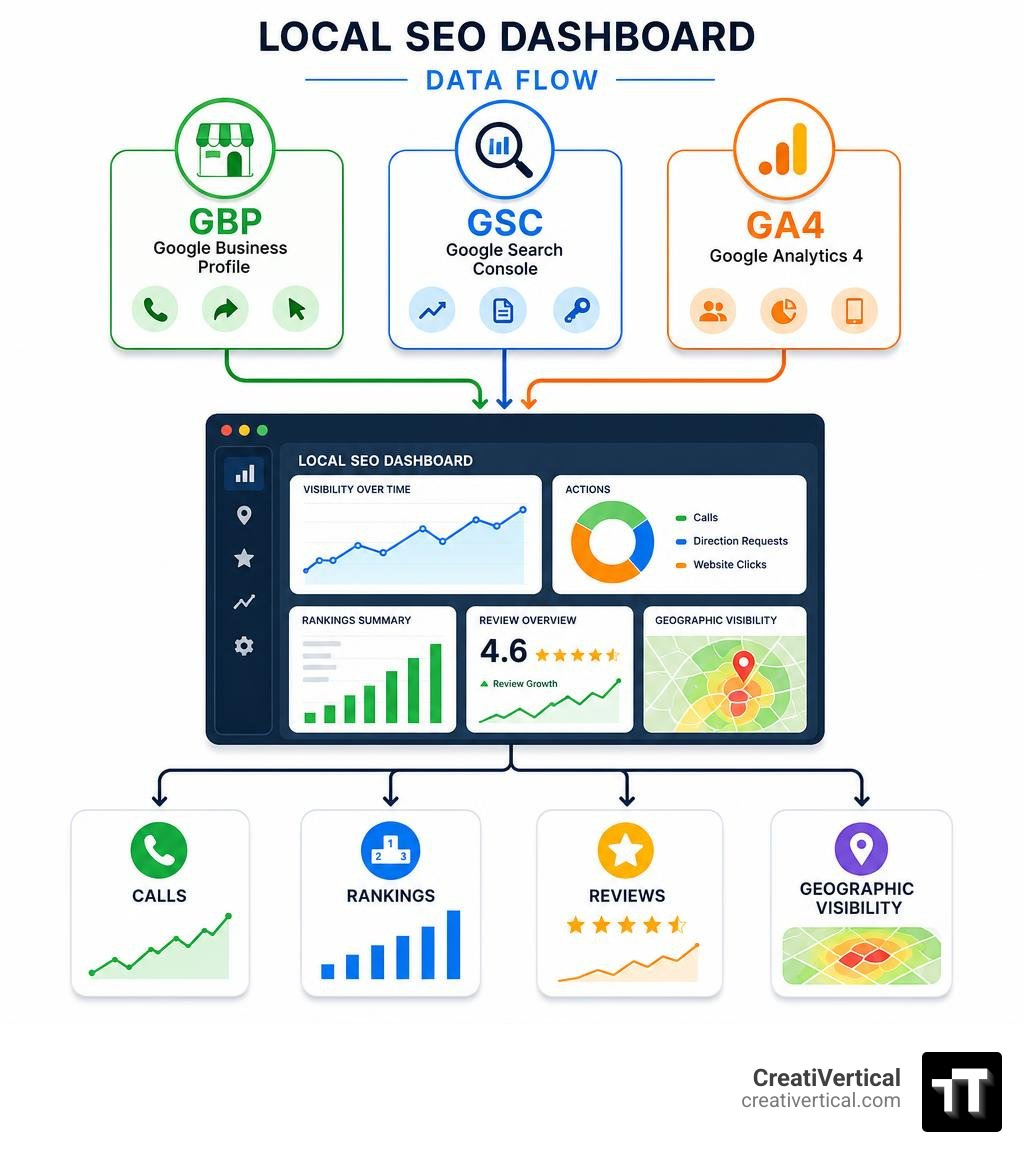
A local SEO reporting dashboard is a single interface that pulls together location-specific search data — from Google Business Profile (GBP), Google Search Console (GSC), Google Analytics, and rank trackers — so you can see exactly how your business performs in local search without jumping between tools.
Here’s what a local SEO reporting dashboard tracks at a glance:
- Visibility — where you rank in the Map Pack, local organic results, and (increasingly) AI-generated summaries
- GBP Actions — phone calls, direction requests, website clicks triggered from your Business Profile
- Review Health — overall rating, review velocity, and sentiment trends
- Keyword Performance — which local search terms drive impressions and clicks
- Geographic Coverage — how visible you are across neighborhoods, not just a single average rank
- Traffic by Device — mobile vs. desktop split, critical because 59.77% of web traffic now comes from mobile
In 2026, local search has shifted. Google’s AI overviews now appear in roughly 13% of local queries, meaning zero-click results are eating into website traffic. Ranking well is no longer enough — you need to track actions, not just positions. A dashboard built for local SEO makes that possible.
I’m Nicholas Cunha, founder of CreatiVertical, and over more than twenty years of agency work — including years building digital infrastructure for government and institutional clients in the British Virgin Islands — I’ve set up and managed local SEO reporting dashboards for businesses operating in small, competitive, and offshore markets where every lead is hard-won and easy to lose. Below, I’ll walk you through everything you need to build one that actually proves results.
Standard SEO Dashboards vs. A Local SEO Reporting Dashboard
If you try to track a local marketing campaign using a standard organic SEO template, you will miss the metrics that actually drive local revenue. Standard dashboards are built for nationwide or global reach. They measure sitewide organic sessions, national keyword rankings, backlink profiles, and general domain authority.
A local SEO reporting dashboard focuses on physical proximity, local intent, and conversion actions. It answers where your customers are physically standing when they search, how often they call your office directly from the search results page, and how your reputation stacks up against competitors in a five-mile radius.
| Metric / Feature | Standard SEO Dashboard | Local SEO Reporting Dashboard |
|---|---|---|
| Primary Traffic Source | Sitewide Organic Sessions (GA4) | Google Business Profile (GBP) & Local Landing Pages |
| Rank Tracking Scope | National or Global SERP Positions | Hyper-local GeoGrid Map Pack Rankings (Street-by-Street) |
| Key Conversion Metric | Form Fills, Newsletter Sign-ups, E-commerce Purchases | Phone Calls, Driving Directions, Direct Messages |
| Reputation Monitoring | Brand mentions across the web | Review velocity, Google rating, and sentiment analysis |
| Primary Device Focus | Desktop and Mobile (balanced) | Mobile-first (immediate transactional intent) |
Essential Metrics and KPIs for Local Search Performance
To build a dashboard that provides genuine strategic value, you must filter out the noise and focus on the core local search ranking factors. The best local dashboards balance visibility metrics with direct customer actions.

When we design systems for our clients, we look at three fundamental pillars of local performance:
- Hyper-Local Visibility: This is your share of voice in the local map packs and organic search results. It tells you if you are showing up when local buyers look for your services.
- Customer Engagement Actions: These are the direct actions taken on your GBP. It includes phone calls, website clicks, and direction requests. This is where we measure actual intent.
- Reputation Metrics: Google’s local algorithm heavily favors businesses with active, positive review profiles. You need to track review velocity (how fast you earn new reviews) and overall sentiment trends.
By monitoring these pillars, you can quickly spot performance gaps. For example, if your visibility is high but your phone calls are dropping, your review rating or GBP completeness might be slipping. To understand how we align these metrics with broader organic visibility strategies, read more about our Adaptive SEO Services.
Tracking Google Business Profile Performance
Your Google Business Profile is the front door of your local digital presence. Within your local SEO reporting dashboard, you should segment your search impressions into three distinct categories:
- Direct Searches: Customers who find your profile by searching for your exact business name or address.
- Discovery Searches: Customers who find your profile by searching for a category, product, or service you offer (e.g., “industrial chemical supplier Missouri”). This is the key metric for measuring SEO growth.
- Branded Searches: Customers who find your profile by searching for a brand related to your business (e.g., a manufacturer brand you distribute).
Additionally, tracking impressions by device is crucial. Mobile traffic represents immediate, high-intent buyers who are often ready to visit or call right away, while desktop users are typically in the research phase. Understanding this split helps you tailor your local landing page content for the device your customers use most. For businesses looking to capture these high-intent local searches in our home state, learn more about our SEO Services in Kansas City.
Visualizing Geographic Visibility and Map Pack Rankings
Traditional rank trackers that give you a single average ranking number for a city are highly misleading. A business might rank #1 when searched from their office lobby, but drop to #12 when searched from a neighborhood three miles away.
To solve this, modern local dashboards use GeoGrid heatmaps. These grids display your Map Pack rankings across a customizable service area (such as a 3×3, 5×5, or 7×7 grid) overlaid directly on a physical map.
This hyper-local visualization allows you to:
- Identify “ranking deserts” where your visibility drops off.
- Compare your street-by-street rankings directly against your top three competitors.
- Track your overall Local Authority score, a proprietary metric that measures your citation footprint, review history, and listing completeness against regional benchmarks.
To see how these visual components come together in an automated setup, you can explore this guide on how to build a local seo reporting dashboard.
How to Build and Automate Your Local SEO Dashboard
The era of manually exporting CSV files from Google Business Profile and pasting them into spreadsheets is over. Manual reporting is slow, prone to errors, and out of date the moment you save the file.
Building an automated local SEO reporting dashboard using platforms like Google Looker Studio, Power BI, or Google Sheets allows you to connect directly to your data sources via API connectors. This ensures your dashboard updates automatically on a daily or weekly schedule, saving marketing teams and agencies hours of manual reporting work each month.
Integrating Data Sources into a Unified Local SEO Reporting Dashboard
To get a complete picture of your local performance, your dashboard must integrate data from several distinct platforms:
- Google Business Profile (GBP) API: Pulls direct action metrics like phone calls, direction requests, review ratings, and local search impressions.
- Google Search Console (GSC): Tracks organic impressions, click-through rates (CTR), and average positions for location-specific search queries.
- Google Analytics 4 (GA4): Tracks user behavior once they click through to your website, showing you local landing page sessions, conversion rates, and bounce rates.
- Third-Party Rank Trackers: Feeds hyper-local map pack rankings and GeoGrid heatmap data directly into your reporting interface.
By blending these sources, you can track the entire customer journey from the initial local map search to the final website conversion. For a detailed breakdown of the platforms available to help you connect these data sources, check out this comparison of the 7 best local SEO reporting tools.
Executive vs. Manager vs. Operational Dashboards
Not everyone in your organization needs to see the same level of data. When building local dashboards, we recommend segmenting your reporting views based on who will be reading them:
- Executive Dashboards: Designed for business owners, partners, and C-suite executives. These focus on high-level business outcomes like total cost per lead (CPL), organic conversion rates, overall market share, and marketing ROI. They are typically reviewed on a monthly or quarterly basis.
- Manager Dashboards: Built for marketing managers and regional directors. These provide cross-location views that let you compare the performance of multiple offices or franchise locations side-by-side. They track goal progress and team alignment, usually on a weekly or bi-weekly cadence.
- Operational Dashboards: Used by SEO analysts and implementation teams. These track highly granular technical KPIs such as crawl errors, citation consistency (NAP audits), minor keyword ranking shifts, and immediate review alerts. They are monitored daily or weekly to guide immediate optimization tasks.
Proving ROI and Retaining Clients with Local SEO Reports
For agencies, a local SEO report is the single most important deliverable you send. It is the bridge between your technical execution and your client’s perception of value. If your reports consist of nothing but a raw list of search rankings, you are failing to prove your worth.
To improve client retention, your reports must translate technical metrics into clear business value. Use clean, visual layouts and plain, client-friendly language rather than technical SEO jargon. Instead of simply listing “impressions,” show how those impressions directly led to phone calls and driving directions.
Adding automated, written insights that explain why metrics changed and outlining your strategic plan for the next 30 days transforms your report from a passive receipt into an active growth roadmap. For agencies looking to build true white-label reports that showcase this strategic value, you can explore the Local Dominator reporting features.
Aligning Local SEO Metrics with Business Revenue
To make your local SEO efforts indispensable, you must connect them directly to your client’s bottom line. This means tracking conversion rates and calculating an accurate cost per lead (CPL).
Across the digital marketing industry, typical performance benchmarks vary significantly by sector. For example, local SEO campaigns often achieve a lower long-term cost per lead ($30 to $90) compared to paid search campaigns ($70 to $300+).
In terms of return on investment, industries like healthcare marketing frequently see SEO ROI ranges of 5:1 to 10:1, while high-intent fields like local home services can see returns ranging from 6:1 to 14:1. For B2B industrial manufacturers or offshore professional services, the lifetime value of a single closed contract can represent a massive multiple of their local marketing spend.
By demonstrating how your local visibility efforts lower customer acquisition costs and drive real conversions, you move the conversation from “marketing expense” to “revenue generator.” To learn more about how we integrate local search strategies with comprehensive lead generation campaigns, read about our Digital Marketing Services in Kansas City.
Frequently Asked Questions
What is the difference between a local SEO dashboard and a standard SEO dashboard?
A standard SEO dashboard focuses on sitewide organic traffic, global keyword rankings, and backlink profiles. A local SEO reporting dashboard is built specifically to track location-based search intent, Map Pack visibility, GeoGrid rankings, and direct customer conversion actions (like phone calls and direction requests) driven by Google Business Profile.
How often should local SEO dashboards be updated?
For operational tracking, dashboards should update weekly using automated scans to catch ranking shifts and technical errors early. For client reviews and executive reporting, a monthly cadence is ideal to analyze broader trends, review velocity, and overall ROI without getting bogged down in daily data fluctuations.
Can I build a local SEO dashboard for free?
Yes. You can build a basic local SEO dashboard for free using Google Looker Studio connected directly to Google Search Console, Google Analytics 4, and Google Business Profile. However, free dashboards generally lack advanced agency-scale features like automated GeoGrid rank tracking, competitor overlays, and deep citation monitoring, which require paid third-party connectors.
Charting Your Course to Data-Driven Local Growth
Managing local visibility across multiple neighborhoods, service areas, or international jurisdictions requires clear, accurate data. A well-constructed local SEO reporting dashboard takes the guesswork out of your marketing, showing you exactly where your strategy is succeeding and where it needs adjustment.
At CreatiVertical, we don’t believe in vanity metrics or automated PDF reports that sit unread in your inbox. We build complete, high-performance digital systems designed to fuel long-term business growth. Whether you are a local Kansas City business looking to dominate your regional market, an industrial manufacturer tracking B2B leads, or an offshore professional service firm navigating highly competitive global landscapes, we act as your ongoing digital growth partner.
If you are ready to stop guessing and start measuring the real return on your marketing spend, explore our 7 Tips to Improve Local Visibility Online or get in touch with our team today to map out your local growth strategy.