
Why the Right SEO Reporting Tools Can Make or Break Your Agency
The best SEO reporting tools for agencies in 2026 are:
- Whatagraph – Best overall for multi-client automation and cross-channel data blending
- AgencyAnalytics – Best for client-facing dashboards and rank tracking
- DashThis – Best for quick, clean automated client reports
- TapClicks – Best for enterprise scale with 250+ connectors
- Databox – Best for visual KPI dashboards
- Swydo – Best for straightforward automated SEO reporting
Think about your last Friday afternoon. Were you copying numbers out of Google Search Console, pasting them into Ahrefs, then dropping everything into a spreadsheet — just to build one client report?
You’re not alone. According to a 2025 study, agencies spend 20 to 30 hours per client per month on reporting. For a 10-client agency, that’s up to 300 hours a month — time that could go toward actual strategy and growth work.
The problem isn’t effort. It’s the wrong tools, or no tools at all.
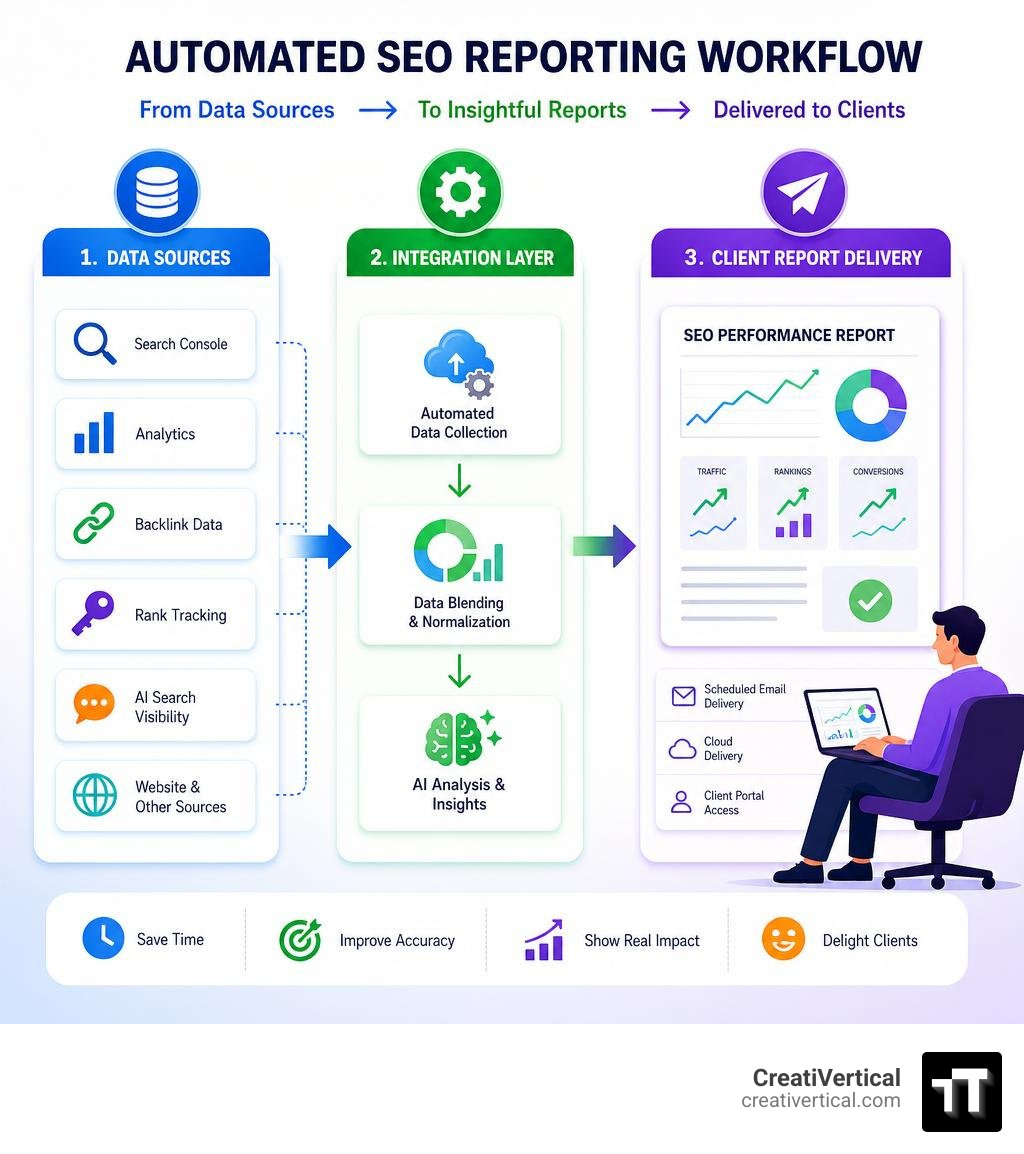
And in 2026, the gap between agencies that automate reporting and those that don’t is getting harder to ignore. Modern SEO reporting tools don’t just pull data — they blend it across channels, write performance narratives with AI, track brand visibility inside ChatGPT and Perplexity, and deliver polished white-labeled reports to clients on a schedule, without anyone lifting a finger.
Most clients don’t care about impressions. They care about whether your work is driving traffic, leads, and revenue. The right reporting tool helps you show that story clearly — and stop wasting weekends stitching together spreadsheets.
I’m Nicholas Cunha, founder of CreatiVertical, with over 20 years of agency experience across web development, SEO, and applied AI — and SEO reporting tools have been a core part of how I help clients understand what’s actually working. In this guide, I’ll break down the six best options for agencies in 2026, what separates the good from the frustrating, and what to look for as AI search changes the reporting landscape entirely.
Terms related to seo reporting tools:
Key Features to Evaluate in Modern SEO Reporting Tools
To prevent reporting from turning into a second full-time job, you need to evaluate software based on how well it acts as a background process. If you have to log in every week to fix broken connections or manually adjust layout boxes, the tool is failing you.
When we evaluate reporting systems for our partners — whether they are local businesses here in Kansas City, offshore legal firms in the Caribbean, or industrial manufacturers — we look for several non-negotiable architectural layers.
1. Robust API Integrations
Your reporting tool must connect natively to your entire marketing stack. At a minimum, this means deep, stable integrations with:
- Google Search Console (GSC): To track organic impressions, click-through rates (CTR), and keyword queries without the standard 1,000-row export limits found in the native Google interface.
- Google Analytics 4 (GA4): To filter organic traffic and map search behavior directly to business outcomes like conversions, leads, and revenue.
- Rank and Backlink Trackers: Direct integrations with platforms like Semrush, Ahrefs, or SE Ranking to pull domain authority, keyword positions, and backlink growth.
2. Automated Scheduling and Delivery
A master template should allow you to schedule automated reports on a daily, weekly, or monthly cadence. Once configured, the platform should pull the latest data, generate the report, and email a secure, interactive link or a polished PDF directly to your clients.
3. Professional White-Labeling
To maintain brand authority, your reporting tool must support full white-labeling. This goes beyond slapping your logo on a header. It includes hosting client dashboards on your own custom domain (e.g., reports.youragency.com via a CNAME record), customizing the color palettes, and sending automated emails from your own domain name.
4. Cross-Channel Data Blending and a Governed Data Layer
The most common mistake in digital marketing is presenting SEO in a vacuum. If you are running local campaigns, you need to show how organic search works alongside paid search (PPC) and local map listings. A governed data layer allows you to define custom metrics once (such as combining GSC clicks and PPC clicks into a single “Total Search Traffic” metric) and apply it consistently across all client dashboards.
To learn how to structure these dashboards for maximum clarity, check out The Ultimate Local SEO Reporting Dashboard Guide for Data Geeks.
The 6 Best SEO Reporting Tools for Agencies in 2026
When choosing a platform, scalability is the ultimate differentiator. If you manage multiple clients, you cannot afford to manually edit 20 different dashboards every time you want to update a single KPI widget. You need a platform that supports master templates—where a single structural edit cascades across every linked client report instantly.
Here is how the top six seo reporting tools compare in 2026:
| Tool | Primary Pricing Model | Core Strength | Key Integrations | AI & MCP Readiness |
|---|---|---|---|---|
| Whatagraph | Flat Fee (Tiered) | Cross-channel data blending & unified data layer | 60+ native connectors (GSC, GA4, Semrush, PPC) | High (AI narratives & automated summaries) |
| AgencyAnalytics | Per-Client (with add-ons) | Built-in rank tracking & client portals | GSC, GA4, local SEO, social, paid channels | Medium (AI-generated performance insights) |
| DashThis | Flat Fee (by report volume) | Rapid setup with simple widget customization | GSC, GA4, major SEO & social APIs | Basic (automated templates & email delivery) |
| TapClicks | Custom Enterprise | Massive scalability & data warehousing | 250+ connectors, custom database ingest | High (Enterprise-grade predictive modeling) |
| Databox | Per-Source / Tiered | Highly visual KPI dashboard tracking | GSC, GA4, HubSpot, CRM integrations | Medium (AI-driven goal forecasting) |
| Swydo | Per-Client / Volume | Clean, straightforward automated PDF reports | GSC, GA4, Google Business Profile, SEO APIs | Basic (automated scheduling & dynamic text) |
For a broader look at the software landscape, you can read more about 10 Free & Paid SEO Reporting Tools in 2026.
Why Whatagraph Leads the Pack of SEO Reporting Tools
Whatagraph has established itself as the premier reporting platform for multi-client agencies that need to blend complex data streams without writing code.
Instead of forcing you to build dashboards from scratch for every new account, Whatagraph uses a highly intuitive, drag-and-drop interface backed by a governed data layer. This means if you manage ten different local businesses in the Kansas City area, you can create a single master template, link it to all ten accounts, and let the software automatically populate the correct localized data for each client.
Key Strengths:
- 60+ Native Connectors: Direct, stable APIs that boast a 99.95% average uptime, eliminating the frequent connection dropouts common in lower-cost tools.
- No-Code Data Blending: Easily merge organic traffic from GA4 with paid search spend from Google Ads to show a unified Customer Acquisition Cost (CAC).
- Custom Formulas: Define custom KPIs once and apply them across your entire portfolio.
- Polished White-Labeling: Full CNAME customization, custom email delivery, and completely branded client portals.
How AgencyAnalytics and DashThis Compare as Client-Facing SEO Reporting Tools
For agencies that prioritize interactive client portals and built-in SEO utility, AgencyAnalytics and DashThis are two of the most popular choices on the market, though they serve very different workflows.
AgencyAnalytics: The All-in-One Client Command Center
AgencyAnalytics is built specifically for marketing agencies. Its standout feature is its built-in suite of SEO tools, including native rank tracking and site auditing. This means you do not necessarily need to pay for external rank-tracking add-ons to show daily keyword movements to your clients.
- Pros: Dedicated client logins with granular permissions; built-in rank tracking (available as a scalable add-on); automated site health audits; clean, modern user experience.
- Cons: Pricing can scale up quickly if you manage hundreds of clients and require high-volume keyword tracking.
DashThis: The Quick and Simple Report Builder
DashThis takes a different approach, focusing entirely on speed and simplicity. If you want to get a clean, automated report in front of a client in under ten minutes, DashThis is incredibly efficient.
- Pros: Extremely easy to use; excellent pre-built templates for SEO, PPC, and social media; responsive customer support.
- Cons: The dashboard customization can feel slightly rigid compared to Whatagraph. Additionally, some users note that the insights section, where you write custom performance notes, feels more like a basic text editor than a modern, interactive workspace.
Specialized Alternatives: TapClicks, Databox, and Swydo
Depending on your agency’s specific niche and scale, one of these specialized reporting tools may better fit your operations.
TapClicks: Enterprise Data Warehousing
TapClicks is built for large, enterprise-level agencies and media companies managing massive advertising portfolios. It features over 250 native connectors and includes built-in data warehousing, making it the most powerful tool for handling millions of data rows. However, its steep learning curve and enterprise pricing make it overkill for small-to-medium agencies.
Databox: Visual KPI Tracking
Databox is designed for teams that want real-time visibility into specific business KPIs. It excels at displaying clean, visual metrics on office screens or mobile apps. The main limitation is that the reporting interface can sometimes feel restrictive — almost like being inside a presentation slide deck — which makes long-form, detailed technical SEO reporting more difficult to format.
Swydo: Straightforward PDF Automation
Swydo is a highly reliable, cost-effective option for agencies that prefer clean, structured PDF reports over interactive, live dashboards. It is particularly popular for tracking link-building campaigns, Google Business Profile local metrics, and core search rankings without unnecessary design clutter.
The Shift to AI-Native Reporting and GEO Metrics
The search landscape is undergoing a massive shift. While 68% of online experiences still begin with a search engine, buyers are increasingly turning to AI-driven tools like ChatGPT, Claude, and Perplexity to find answers.
This shift has created a brand-new optimization discipline: Generative Engine Optimization (GEO). Traditional SEO reporting tools that only track Google SERP positions are no longer showing the whole picture. Modern agencies must track their clients’ “Share of Voice” and citations within LLM responses.
Tracking AI Visibility with SEOcrawl AI and Sitechecker
Next-generation tools like SEO Reports Software: Build & Automate Your Reports | SEOcrawl AI are bridging the gap between traditional search and the AI era. These platforms allow you to:
- Monitor LLM Referrals: Segment your GA4 traffic to isolate and track the exact volume of visitors arriving at your site from ChatGPT, Claude, and Perplexity.
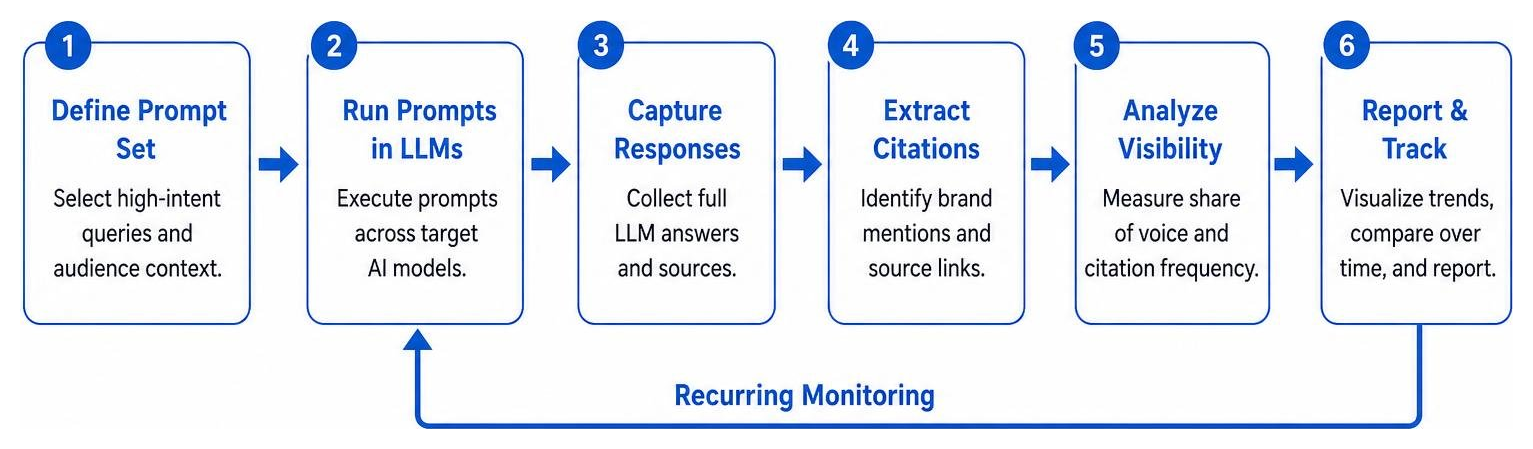
- Track AI Citations: Configure recurring prompt sets to monitor how often your brand is recommended by various AI models for high-intent search queries.
- Overlay Performance Annotations: Automatically mark Google Core Updates and site changes directly on your traffic charts to demonstrate cause-and-effect.
AI-Native Querying with Model Context Protocol (MCP)
For forward-thinking agencies, the days of static dashboards are drawing to a close. The industry is moving toward “dashboard-free” AI analysis using the Model Context Protocol (MCP).
MCP is an open standard that allows AI assistants (like Claude Desktop or Cursor) to connect securely to external data sources. By using a hosted MCP server like GenieSeo — Google Search Console + GA4 MCP for Claude & Cursor, you can connect your live Google Search Console and GA4 data directly to an LLM in under 60 seconds.
Instead of exporting CSV files and building pivot tables, you can simply ask Claude:
“Which of our manufacturing client’s landing pages have seen a drop in organic traffic over the last 90 days, and what are the top queries we lost traction on?”
The AI queries your live data layer, performs the analysis, and writes a polished, client-ready performance narrative instantly. This is a core component of how we deliver our Adaptive SEO Services: The Ultimate Guide to Staying Ahead of Google.
Frequently Asked Questions about SEO Reporting Tools
How do pricing models differ among top SEO reporting tools?
Pricing models in the reporting space generally fall into three categories:
- Per-Client / Per-Campaign: You pay a base fee that scales as you add more client accounts (e.g., AgencyAnalytics). This is highly predictable but can become expensive if you have many small-budget clients.
- Per-Source / Per-Connection: You pay based on the number of data sources you connect (e.g., Databox). This is ideal if you only need to track GSC and GA4 for a large number of clients, but costs rise quickly if you add social, paid, and email sources.
- Flat Fee / Tiered Plans: You pay a flat monthly fee for a set number of reports and users (e.g., Whatagraph). This is highly scalable for larger agencies.
- Enterprise Burst Pricing: Enterprise platforms often charge a base fee plus a micro-cost (such as $0.45 per thousand rows) for high-volume keyword ingestion.
What is Model Context Protocol (MCP) and why does it matter for SEO?
Model Context Protocol (MCP) is an open-standard protocol that acts as a secure bridge between AI models and live data sources. It matters for SEO because it eliminates the manual labor of reporting.
Instead of spending hours formatting charts, an agency can use an MCP server to let an AI assistant safely read read-only search console and analytics data. The AI can then perform complex data cross-referencing—such as matching GSC landing page clicks with GA4 conversion rates—to identify high-intent pages that need content optimization.
What are the common pitfalls of free or low-cost SEO reporting tools?
While free tools like Looker Studio are highly customizable, they come with significant hidden costs:
- Data Sampling and API Limits: GA4 frequently samples data when high volumes are queried, leading to inaccurate reports. Native GSC exports are also limited to 1,000 rows.
- Connection Fragility: Free connectors frequently break, requiring manual re-authorization and wasting valuable agency hours.
- Lack of Security Compliance: Low-cost tools rarely offer the enterprise-grade security controls, data residency guarantees, or SOC 2 Type II compliance required by government contractors or healthcare clients.
- No Master Template Cascading: If you need to make a structural change to a report, you must open and edit every client’s dashboard individually.
Choosing Your Growth Partner in the AI Search Era
At the end of the day, an SEO report is only as valuable as the strategy it measures. Beautiful charts and automated emails are meaningless if your underlying website architecture is slow, your content doesn’t match search intent, or your brand is invisible to the AI tools your buyers are using.
At CreatiVertical, we don’t believe in “mystery meat marketing” or sending automated PDFs that sit unread in your inbox. We operate as an ongoing growth partner, building complete, high-performance digital systems—from custom web design and bulletproof managed hosting to advanced SEO and applied AI enablement.
Whether you are a local business here in Kansas City looking to dominate local search, an offshore professional service firm in the Caribbean protecting your digital footprint, or an industrial manufacturer tracking complex B2B buyer journeys, we build the systems that drive measurable revenue.
Ready to move beyond basic reporting and build a search strategy designed for the AI era? Let’s chart your course. Explore our Adaptive SEO Services today.