

What Is Cloud Hosting and How Does It Work? (Quick Answer)
What is cloud hosting and how does it work is one of the most common questions businesses ask when evaluating modern web infrastructure — and the short answer is this:
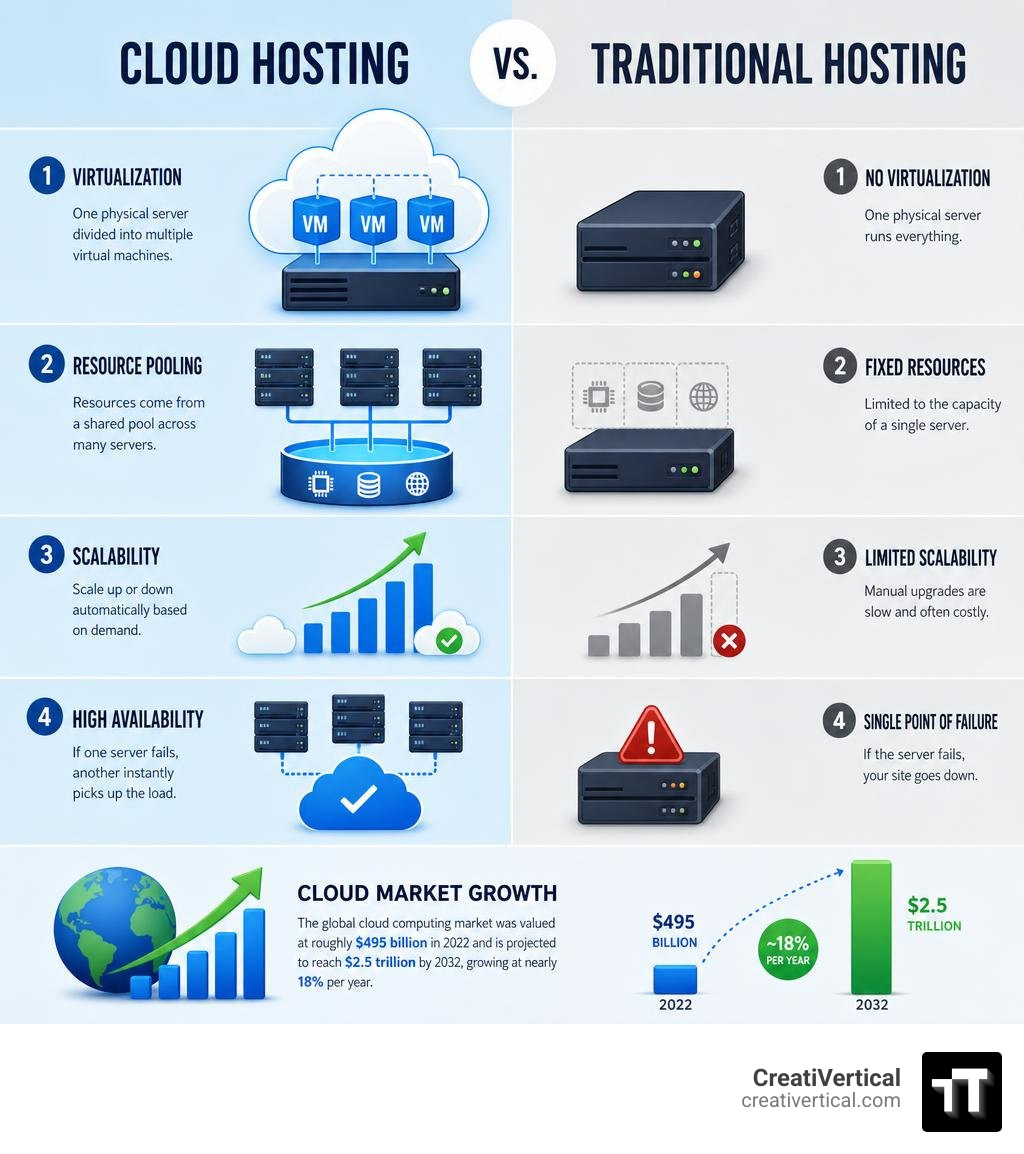
Cloud hosting runs your website or application on a network of connected virtual servers instead of a single physical machine. Here’s how it works at a glance:
| Step | What Happens |
|---|---|
| 1. Virtualization | Physical servers are divided into multiple virtual machines (VMs) using software called a hypervisor |
| 2. Resource pooling | Your site draws compute, storage, and bandwidth from a shared pool across many servers |
| 3. Geographic distribution | That pool spans data centers in multiple locations, so traffic is served from wherever is closest |
| 4. Dynamic scaling | Resources scale up or down automatically to match your actual demand |
| 5. Pay-as-you-go | You pay only for what you consume — no fixed hardware lease |
Unlike traditional hosting — where one server going down takes your site with it — cloud hosting has no single point of failure. If one physical machine fails, another picks up the load instantly.
The global cloud computing market was valued at roughly $495 billion in 2022 and is projected to reach $2.5 trillion by 2032, growing at nearly 18% per year. That’s not a trend. That’s a structural shift in how businesses run their digital infrastructure.
For Kansas City business owners, offshore professional services firms, industrial B2B manufacturers, and government technology vendors alike, the infrastructure your website and applications sit on directly affects performance, security, and your ability to scale without disruption.
I’m Nicholas Cunha, founder of CreatiVertical — I’ve spent more than twenty years building and managing digital infrastructure for clients ranging from BVI government agencies to Kansas City small businesses, which means I’ve seen how the wrong hosting decision creates bottlenecks, and how understanding what cloud hosting is and how it works unlocks real operational flexibility. Below, we’ll walk through the mechanics, the tradeoffs, and what actually matters when choosing a cloud hosting setup for your business.
What Is Cloud Hosting How Does It Work?
To understand how cloud hosting works, we have to look at how we got here. In the early days of the web, hosting a website meant renting space on a physical server sitting in a rack somewhere. If that server had a hardware failure, or if too many people visited your site at once, your website simply crashed.
Cloud hosting changes this dynamic entirely by replacing physical constraints with virtual flexibility. Instead of relying on one physical box, cloud hosting utilizes a vast, interconnected network of physical and virtual servers. This decentralized setup ensures that your web application is never dependent on a single physical host.
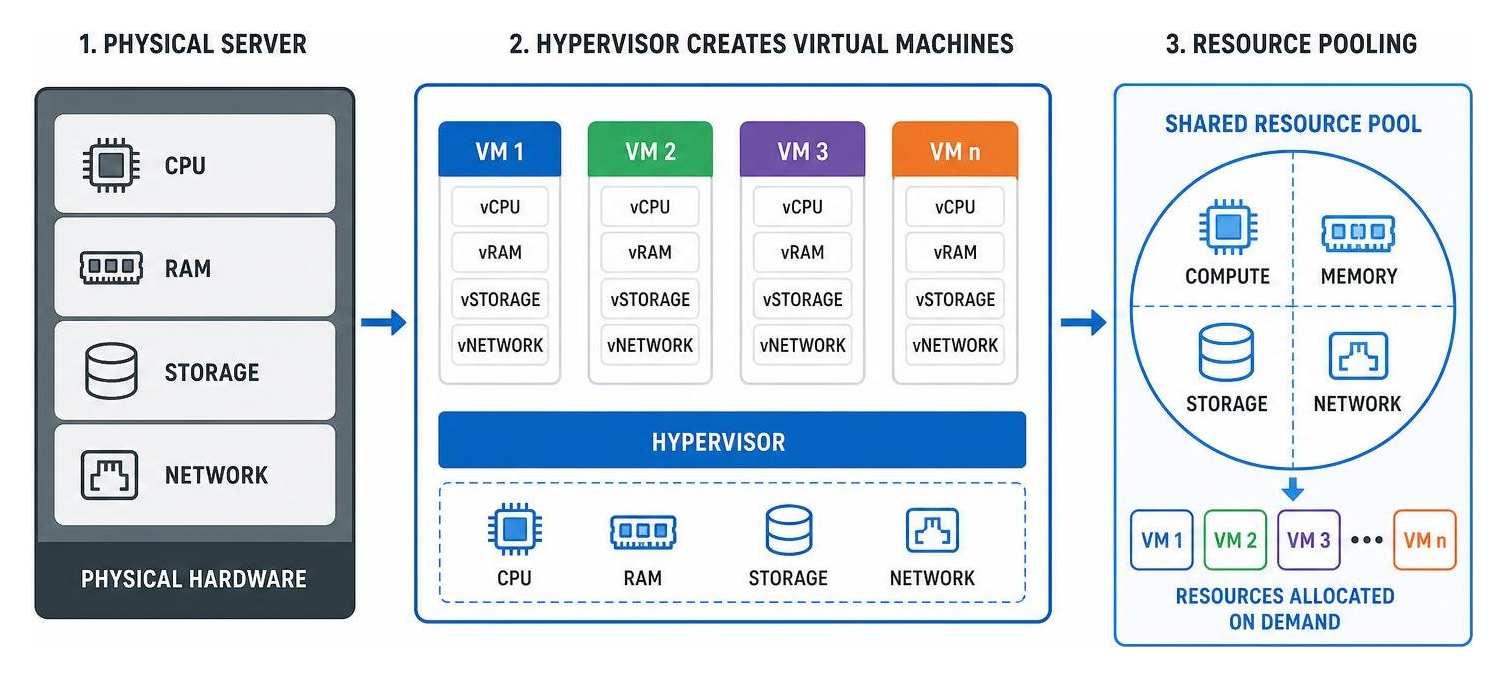
At its core, this architecture is powered by virtualization. Virtualization software, known as a hypervisor, is installed on physical servers. The hypervisor abstracts the physical hardware resources—like CPU, RAM, and storage—and carves them up into isolated virtual environments called Virtual Machines (VMs).
Because these VMs are decoupled from the physical hardware, they can be replicated, moved, and scaled instantly across a massive cluster of servers. If you want to dive deeper into the core definitions of these services, you can read more about how this infrastructure operates directly from What is Cloud Hosting? – Cloud Server Hosting Explained – AWS.
Demystifying What Is Cloud Hosting How Does It Work for Modern Businesses
For a business owner, the easiest way to understand cloud hosting is to compare it to the municipal electricity grid. When you plug a device into an outlet, you do not need to know which power plant generated the electricity, nor do you buy a generator just to keep your lights on. You simply pull the power you need, when you need it, and pay for the exact amount of kilowatt-hours you consume.
Cloud hosting operates on this exact utility model. Your business gains on-demand access to compute power and storage without having to purchase, configure, or maintain physical servers in-house. The underlying physical hosts are housed in highly secure, climate-controlled remote data centers managed by third-party providers.
This model shifts your IT costs from capital expenditures (buying hardware) to operational expenditures (paying for resources as you use them). To explore how this shift impacts enterprise operations and data management, you can review the structural breakdown provided by What Is Cloud Hosting? | IBM.
Technical Architecture: What Is Cloud Hosting How Does It Work Under the Hood
Under the hood, cloud hosting is a masterpiece of software-defined engineering. When a user visits your website, their request doesn’t just hit a single hard drive. Instead, a load balancer directs the incoming traffic across a cluster of virtual servers to ensure no single machine is overwhelmed.
The hypervisor manages the CPU scheduling and RAM allocation in real time. If your site experiences a sudden surge in traffic, the hypervisor dynamically allocates more processing power from the physical hardware pool to your virtual machine.
Furthermore, your files aren’t stored on a single local disk. They are distributed across high-speed storage clusters—often utilizing solid-state drives (SSDs) or non-volatile memory express (NVMe) storage—which are replicated across different physical racks to prevent data loss. For a highly technical breakdown of how virtual environments manage these resources, the resource guide on Virtual Server Hosting – Technology Resources offers excellent insight into resource partitioning.
Cloud Hosting vs. Traditional Web Hosting
When choosing how to publish your website or application, it helps to compare cloud hosting against the traditional options. Each has its place, but the differences in scalability, reliability, and performance are stark.
| Hosting Type | Resource Allocation | Scalability | Reliability (Uptime) | Ideal For |
|---|---|---|---|---|
| Shared Hosting | Shared with hundreds of other sites on one server | Extremely limited; rigid caps | Low; “noisy neighbors” can crash your site | Simple blogs, low-traffic local sites |
| VPS Hosting | Dedicated portion of a single physical server | Moderate; limited by physical hardware caps | Medium; isolated but still dependent on one host | Growing sites with predictable traffic |
| Dedicated Hosting | Entire physical server reserved for you | Low; requires manual upgrades/downtime | High, but vulnerable to single-point hardware failure | Large enterprises, highly sensitive data |
| Cloud Hosting | Pooled resources across multiple physical servers | Unlimited; scale up or down instantly | Very High; built-in failover redundancy | E-commerce, SaaS, fast-growing businesses |
To understand the core differences in everyday terms, you can check out the community discussions on What is cloud hosting, and how does it differ from traditional web hosting?.
Shared and Dedicated Hosting vs. Cloud Infrastructure
With traditional shared hosting, your website shares a single server’s resources with hundreds of other sites. If one of those neighboring websites experiences a traffic spike or gets hacked, your site can slow to a crawl or go offline. This is known as the “noisy neighbor” effect.
Dedicated hosting solves this by giving you an entire physical server all to yourself. It offers incredible power and security, but it comes with high capital costs, requires manual physical maintenance, and cannot scale quickly. If you outgrow your dedicated server, you must purchase new hardware and migrate your files, which often causes planned downtime.
Cloud hosting eliminates these tradeoffs. It gives you the resource isolation of a dedicated server with the cost efficiency of shared hosting, all backed by a network that doesn’t care if a single physical machine fails. You can read more about how cloud infrastructure bypasses these physical limitations at What is Cloud Hosting? | OVHcloud Worldwide.
VPS Hosting vs. True Cloud Scalability
Virtual Private Server (VPS) hosting is often confused with cloud hosting because both use virtualization. However, a traditional VPS is created by carving a single physical server into multiple isolated virtual compartments. While your resources are guaranteed and you won’t suffer from noisy neighbors, your scaling is strictly limited by the physical limits of that specific machine.
True cloud hosting, by contrast, pools resources across multiple physical machines. If your application needs more memory than a single physical server can provide, the cloud environment seamlessly pulls resources from other machines in the cluster.
This dynamic scaling and built-in failover redundancy are what separate true cloud hosting from traditional VPS setups. For a comprehensive comparison of these virtualization methods, refer to What is Cloud Hosting? A Comprehensive Guide to Hosting Services in the Cloud | DigitalOcean.
Cloud Service Models and Deployment Types
Cloud hosting is not a one-size-fits-all solution. It is delivered through different service models and deployed in various configurations depending on your business’s technical expertise, budget, and compliance needs. To get a broad overview of how these models fit together for beginners, you can consult What Is Cloud Hosting? Complete Beginner Guide (2026).
Infrastructure, Platform, and Software as a Service (IaaS, PaaS, SaaS)
The cloud ecosystem is generally divided into three distinct service tiers:
- Infrastructure as a Service (IaaS): This is the foundation of cloud hosting. The provider supplies the raw computing power, virtual servers, storage, and networking, while you remain responsible for installing and managing the operating system, databases, and application code. Examples include Amazon EC2 and Google Compute Engine.
- Platform as a Service (PaaS): In this model, the provider manages the underlying infrastructure, operating systems, and database engines. You only need to deploy your application code. This is ideal for developers who want to build software without worrying about server administration. Examples include Heroku and AWS Elastic Beanstalk.
- Software as a Service (SaaS): This is a complete, fully managed software application delivered over the internet. The provider handles everything from the physical servers to the application interface. Examples include Microsoft 365, Salesforce, and modern cloud-based website builders.
Public, Private, Hybrid, and Multi-Cloud Deployments
How your cloud infrastructure is deployed depends on who has access to the physical hardware:
- Public Cloud: The cloud infrastructure is owned by a third-party provider (like AWS, Google Cloud, or Microsoft Azure) and shared among multiple tenants over the public internet. This is the most cost-effective and scalable option for most businesses.
- Private Cloud: The cloud infrastructure is dedicated entirely to a single organization. It can be hosted in the company’s on-premises data center or managed by a third party. This offers maximum security and data sovereignty, making it popular with financial institutions and government contractors.
- Hybrid Cloud: This model combines public and private clouds, allowing data and applications to be shared between them. A retailer might use a highly secure private cloud to store sensitive customer payment data while using a highly scalable public cloud to handle seasonal web traffic spikes.
- Multi-Cloud: This approach uses services from multiple public cloud providers (e.g., hosting your database on Google Cloud while running your web servers on AWS) to prevent vendor lock-in and maximize redundancy.
Key Benefits and Risks of Cloud Hosting
As with any technology, moving to the cloud involves weighing clear operational advantages against potential risks. For a balanced look at these factors, you can read Google’s perspective at What is Cloud Hosting? Benefits and Risks | Google Cloud.

Operational Benefits: Scalability, Reliability, and Performance
The most significant operational benefit of cloud hosting is its effortless scalability. If your business runs an e-commerce storefront and experiences a massive traffic spike during a holiday sale, your cloud hosting environment will automatically scale up its resources to keep your site fast and responsive.
This high reliability is backed by strict Service Level Agreements (SLAs) that guarantee 99.9% to 99.99% uptime. Because your data is replicated across multiple physical locations, a localized power outage or hardware failure won’t bring your business to a halt.
To put this in perspective, when Amazon experienced just one hour of downtime during its Prime Day sales in 2018, it lost an estimated $100 million. For any business, avoiding downtime is directly tied to protecting your bottom line. Additionally, by utilizing global Content Delivery Networks (CDNs) and ultra-fast NVMe storage, cloud hosting delivers your content to users with incredibly low latency.
Security Risks and Mitigation Strategies
While the cloud is highly secure, it operates on a shared responsibility model. The cloud provider is responsible for securing the physical infrastructure, hypervisors, and data centers. However, you are responsible for securing what you put inside the cloud—including your application code, user access controls, and data configurations.
Common risks include misconfigured storage buckets (which can leave data exposed to the public) and weak access credentials. To protect your digital assets, it is critical to implement robust Website Hosting Security measures, such as:

- Enforcing multi-factor authentication (MFA) for all administrative accounts.
- Encrypting data both in transit (using SSL/TLS) and at rest.
- Deploying web application firewalls (WAFs) to block malicious traffic.
- Conducting regular security audits and vulnerability scans.
For businesses working under strict regulatory frameworks like FedRAMP, FISMA, or HIPAA, choosing a cloud hosting partner that maintains certified, compliant environments is non-negotiable.
Frequently Asked Questions About Cloud Hosting
Is cloud hosting secure for highly regulated industries?
Yes, provided you configure it correctly and choose the right deployment model. For organizations operating under strict compliance frameworks like FedRAMP, FISMA, or HIPAA, a private cloud or a highly controlled hybrid cloud setup is often the best choice.
These environments offer physical and logical isolation, ensuring that sensitive data is stored and processed according to strict regulatory standards. When paired with end-to-end encryption, continuous monitoring, and automated compliance tracking, cloud hosting can easily meet or exceed the security of traditional on-premises data centers.
How does pay-as-you-go pricing actually work?
Pay-as-you-go pricing works by metering the exact virtual resources your application consumes. Instead of paying a flat monthly fee for a physical server that sits idle 90% of the time, you are billed based on:
- Compute time: The number of hours your virtual servers are active and the size of those servers (vCPUs and RAM).
- Storage: The amount of data stored in gigabytes per month.
- Data transfer: The bandwidth used to send data out of the cloud network to your users.
To prevent unexpected bills, most cloud platforms allow you to set budget caps and automated alerts that notify you if resource consumption exceeds your target thresholds.
What is the difference between managed and unmanaged cloud hosting?
The difference lies entirely in who handles the day-to-day administration of your servers:
- Unmanaged Cloud Hosting: The provider gives you access to the virtual server, and you are responsible for everything else—including installing the operating system, configuring firewalls, applying security patches, and managing backups. This requires significant systems administration expertise.
- Managed Cloud Hosting: The hosting provider or an external digital systems partner handles the technical heavy lifting for you. They manage server setup, security monitoring, software updates, performance optimization, and automated backups, leaving you free to focus on running your business.
For businesses focused on converting web traffic into actual customers, having a managed partner handle your infrastructure ensures your Website Hosting Lead Management systems run smoothly without technical glitches.
Conclusion
Understanding what is cloud hosting and how does it work is the first step toward building a resilient, high-performance digital presence. By moving away from the physical limitations of traditional single-server hosting, your business gains the agility to scale instantly, the reliability of a distributed network, and the security required to protect your digital assets.
At CreatiVertical, we don’t treat web hosting as an isolated commodity. We deliver complete, performance-focused digital systems—integrating web design, search engine optimization, and custom AI search visibility with fully managed hosting. Whether you are a Kansas City local business, an offshore professional services firm in the Caribbean, an industrial manufacturer, or a government contractor operating under strict compliance guidelines, we act as your ongoing growth partner.
We handle the technical complexities of virtualization, security patching, and server optimization, ensuring your digital infrastructure is always fast, secure, and ready to scale.
If you are ready to move away from rigid, unreliable hosting setups and chart a more resilient course for your business, we can help. Launch your high-performance web infrastructure with CreatiVertical and let us build a digital foundation designed for long-term growth.