

Compare Managed cPanel VPS Plans Before You Buy
A managed cPanel VPS gives your business isolated virtual CPU, RAM, and storage, plus the familiar cPanel and WHM tools for managing websites, email, databases, domains, and user accounts. The hosting provider handles core server work such as provisioning, operating-system updates, security patching, monitoring, and often backups.
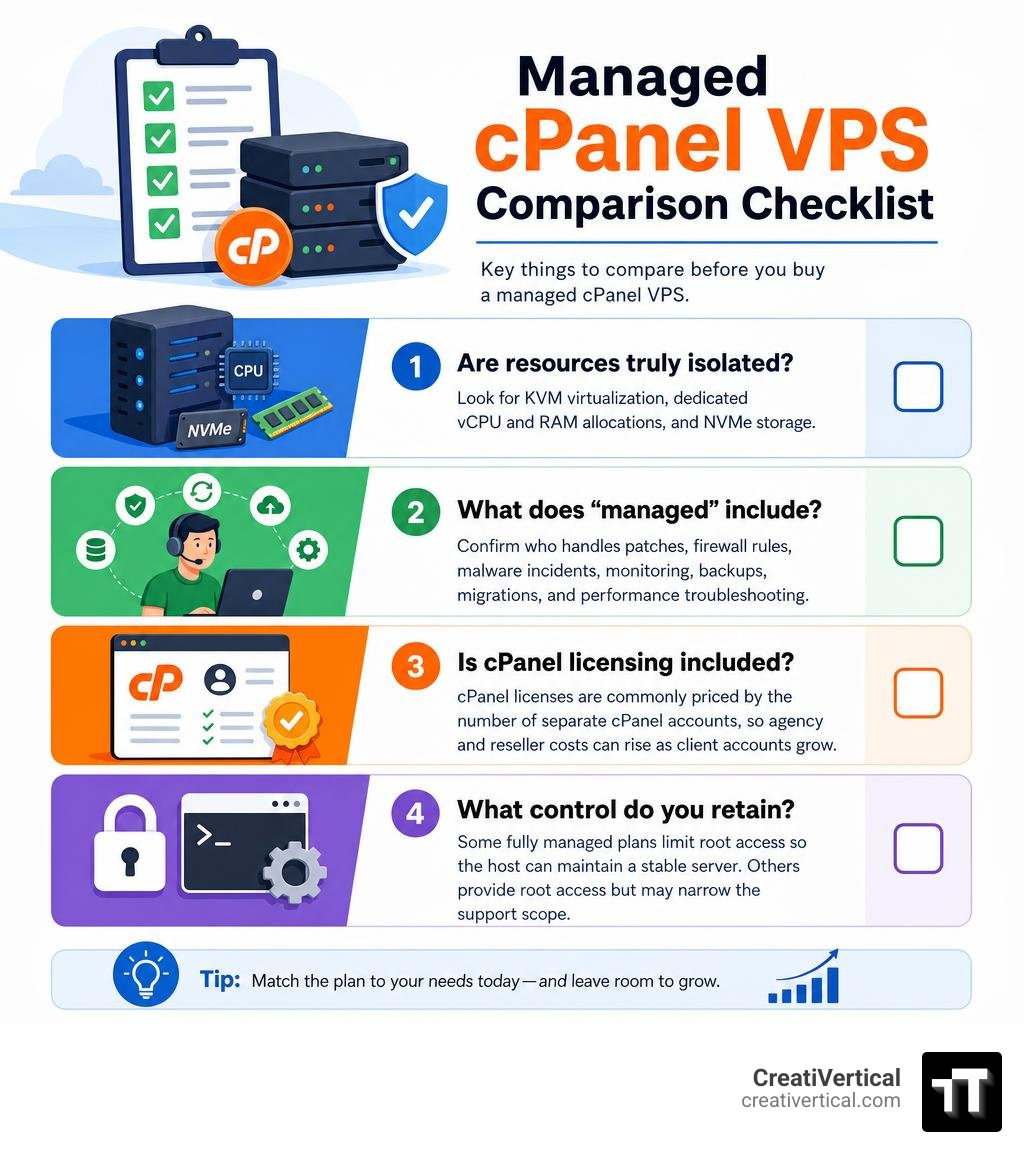
When comparing plans, focus on these four questions first:
- Are resources truly isolated? Look for KVM virtualization, dedicated vCPU and RAM allocations, and NVMe storage.
- What does “managed” include? Confirm who handles patches, firewall rules, malware incidents, monitoring, backups, migrations, and performance troubleshooting.
- Is cPanel licensing included? cPanel licenses are commonly priced by the number of separate cPanel accounts, so agency and reseller costs can rise as client accounts grow.
- What control do you retain? Some fully managed plans limit root access so the host can maintain a stable server. Others provide root access but may narrow the support scope.
This is the practical middle ground between shared hosting, where neighboring sites can affect performance, and an unmanaged VPS, where your team owns the sysadmin work. It can fit an agency with separate client accounts, an e-commerce site that needs steadier resources, or a B2B firm that needs reliable web, email, and database administration without building an internal server operations team.
I am Nicholas Cunha, founder of CreatiVertical, with more than 20 years in agency, web development, SEO, and production technology work for businesses and institutions. I have worked hands-on with hosting panels, WordPress, Cloudflare, and web infrastructure, so this managed cPanel VPS comparison focuses on the operational details that affect real sites rather than plan-page promises.
Basic managed cpanel vps vocab:
Core Architecture: Virtualization, Management, and Control
At the heart of any reliable virtual private server is hypervisor-level isolation. Kernel-based Virtual Machine (KVM) virtualization partitions physical server hardware into distinct virtual environments. Unlike older container-based models that share an underlying operating system kernel, KVM assigns strictly reserved vCPU cores, physical memory, and storage blocks to your server instance.
In an unmanaged setup, your team handles system administration, security configurations, and troubleshooting. A managed configuration transfers that technical maintenance to the hosting vendor. The host manages automated operating system updates, core software patches, uptime tracking, and service daemon monitoring (such as Apache, LiteSpeed, MySQL, and Exim mail transfers).
For teams looking for technical context on service boundaries, our in-depth guide to managed hosting breaks down vendor responsibilities across different infrastructure tiers. In a managed environment, server provisioning includes pre-configured security baselines, customized web stacks, and server-to-server migration assistance using native tools to minimize cutover downtime.
Managed cPanel VPS vs Shared Hosting and Unmanaged Slices
Selecting the appropriate hosting environment requires balancing isolation, maintenance, and administrative control.
- Shared Hosting: Multiple users share a single operating system, memory pool, and web daemon. If a neighboring tenant experiences a traffic surge or runs unoptimized database queries, other sites on the server can experience latency spikes. Administrative access is restricted strictly to an individual cPanel account with no server-level configuration rights.
- Unmanaged VPS: Provides dedicated virtual resources, but the server administrator owns all tasks from the command line interface (CLI). This includes manual Linux kernel updates, firewall rule generation, mail server IP reputation management, and disaster recovery planning.
- Managed cPanel VPS: Combines hardware isolation with graphical administrative control. WebHost Manager (WHM) functions as the top-level parent dashboard to create isolated cPanel accounts for each domain or client. The hosting provider manages base operating system stability, security patches, and hardware uptime service level agreements (SLAs), while you retain point-and-click control over website files, databases, and DNS zones.
Operating System and Web Server Stack Variations
The software stack running behind cPanel dictates how efficiently your server handles concurrent visitors:
- Enterprise Operating Systems: Modern cPanel installations run primarily on enterprise-grade Linux distributions such as AlmaLinux 9 or CloudLinux OS. CloudLinux adds tenant isolation using CageFS, which places each cPanel user inside an isolated virtual file system. This ensures one compromised or overloaded site cannot access or exhaust system resources across other accounts.
- Web Server Engines: Standard Apache HTTP handles general workloads, while high-concurrency environments often implement LiteSpeed Web Server as an in-place alternative. LiteSpeed processes
.htaccessdirectives natively while integrating server-level caching mechanisms to serve cached dynamic content directly from memory, reducing CPU load compared to standard Apache configurations. - Database and Runtime Layers: Current production environments typically deploy MariaDB (such as version 10.6 or 11.4) or MySQL 8.0, paired with multi-version PHP support (PHP 7.4 through PHP 8.3+) to maintain compatibility across legacy applications and modern frameworks simultaneously.
Key Evaluation Criteria for a Managed cPanel VPS

When evaluating hosting infrastructure, look closely at hardware specifications, network interconnects, and vendor service boundaries. Understanding what is cloud hosting helps clarify the difference between pooled, clustered cloud nodes and isolated hypervisor slices.
Hardware and Stack Benchmarks for Managed cPanel VPS Environments
- Storage Bus Architecture: Standard SATA solid-state drives cap read and write throughput over legacy serial interfaces. Enterprise Non-Volatile Memory Express (NVMe) solid-state drives connect over high-speed PCIe lanes, providing lower latency and faster input/output operations per second (IOPS) for heavy database read-write queries.
- Compute and Memory Standards: Multi-core processors, such as modern AMD EPYC or Intel Xeon scalable server chips, provide dedicated compute allocations. Paired with error-correcting code (ECC) DDR5 memory, these processors ensure data integrity during transactional database operations.
- Storage Redundancy: Hardware RAID 10 arrays combine disk mirroring and block striping to preserve uptime and data availability in the event of an individual drive failure.
- Network Throughput: High-capacity network uplinks (ranging from 1 Gbps to 10 Gbps) paired with unmetered or high-capacity data allocations prevent network bottlenecks during traffic surges. Tier III and ISO-27001 certified datacenters maintain redundant power, cooling, and automated distributed denial-of-service (DDoS) mitigation hardware at the network perimeter.
Security Hardening, Backup Protocols, and Compliance
A managed VPS should feature multi-layer defensive tooling managed directly by the host:
- Active Defense Suites: Integrated security platforms like Imunify360 or Monarx run continuous file-system scanning, proactive Web Application Firewalls (WAF), and automated real-time malware cleanup rather than simple scheduled signature scans.
- Network and Port Policies: Outbound email ports (such as Port 25 and 465) are often monitored or restricted to protect server IP reputation and prevent spam blacklisting.
- Automated Backup Redundancy: Disaster recovery depends on remote, off-server backup replication. Tools like JetBackup 5 create incremental, snapshot-based daily backups stored on physically separate storage nodes (ideally maintaining a storage ratio equal to or greater than the primary disk capacity), enabling one-click database and file restorations.
- Compliance Considerations: For regulated organizations handling sensitive workloads, our practical guide to FedRAMP compliant web hosting covers strict baseline controls, boundary monitoring, and compliance measures required beyond standard commercial configurations.
cPanel Licensing Models and Total Cost of Ownership
When budgeting for a managed virtual private server, factor in the separation between raw server compute costs and control panel software licensing. cPanel utilizes a tiered per-account billing model:
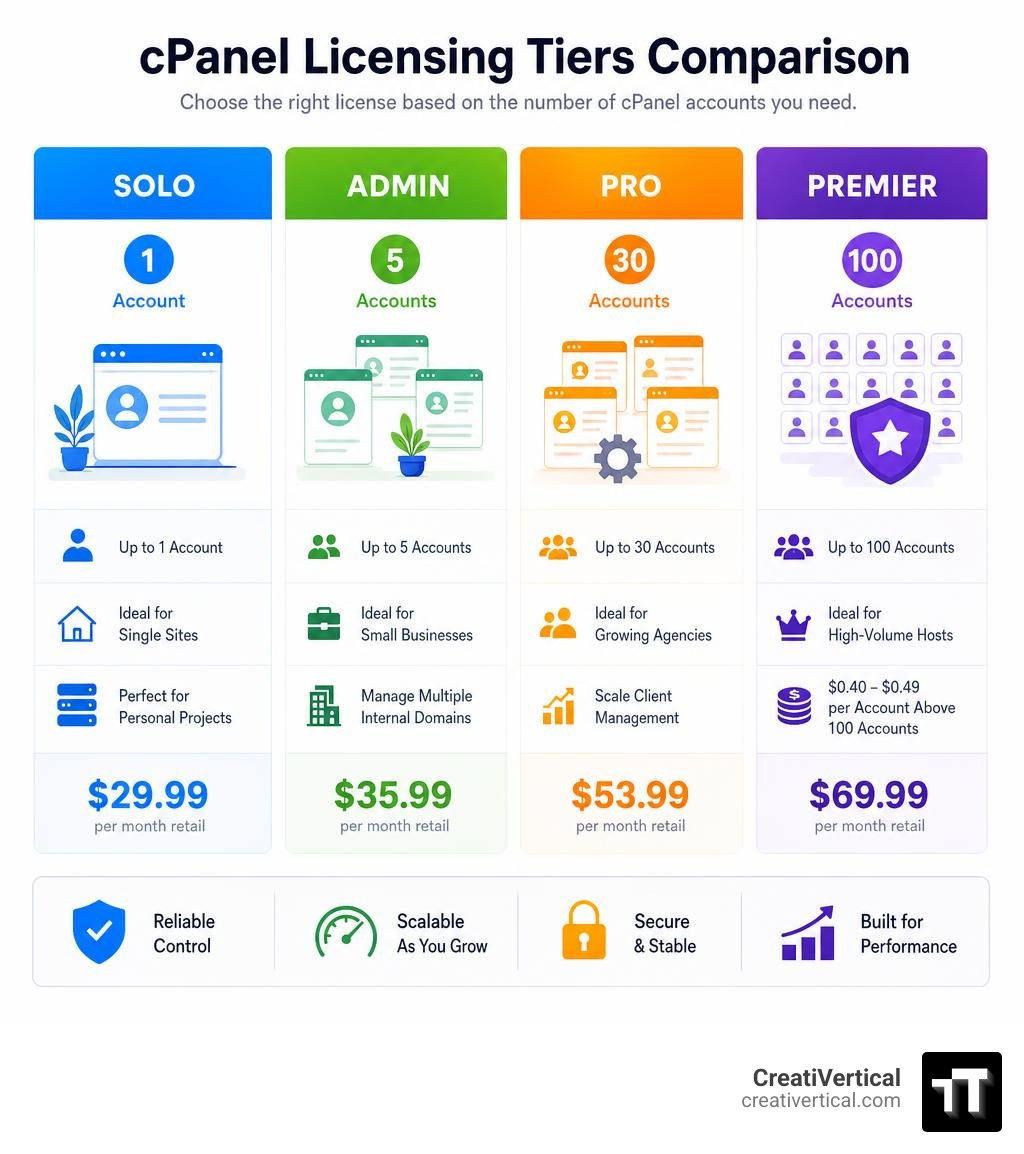
- cPanel Solo: Designed for single-site operators or dedicated projects, licensing exactly one cPanel account on a cloud or VPS instance (typically around $29.99 per month retail).
- cPanel Admin: Licenses up to 5 distinct cPanel accounts, fitting small businesses managing a localized cluster of internal domains (typically around $35.99 per month retail).
- cPanel Pro: Supports up to 30 accounts, matching mid-sized agency client management requirements (typically around $53.99 per month retail).
- cPanel Premier: Accommodates 100 accounts (typically around $69.99 per month retail), with fixed per-account surcharges (often $0.40 to $0.49 per account) applied above that baseline.
Every licensed VPS requires a dedicated, static public IPv4 address. While some providers bundle entry-level cPanel licenses into the advertised package price, others invoice licensing fees as an add-on item. Transparent total cost of ownership (TCO) calculations should always incorporate your expected account volume, web server engine upgrades, and remote backup storage allotments.
Side-by-Side Comparison of Top Hosting Providers
The hosting market includes a range of managed VPS providers, from entry-level compute instances to fully bundled agency platforms. The table below outlines typical specifications, licensing approaches, support structures, and uptime guarantees across major market segments.
| Provider / Plan Type | Base Hardware Profile | Storage Architecture | cPanel Licensing Model | Management & Support Scope | Uptime SLA Guarantee | Typical Starting Market Rates |
|---|---|---|---|---|---|---|
| AllHost (Managed NVMe VPS) | 2 to 8 vCPUs, 4GB to 16GB RAM | 100GB to 500GB NVMe SSD | Includes Solo tier; upgradeable for multi-account | Fully managed OS, proactive monitoring, 30m sysadmin/mo | 99.99% SLA | £36.95 – £83.95 /mo |
| Liquid Web (Managed VPS) | 2 to 8 vCPUs, 2GB to 16GB RAM | 40GB to 200GB SSD (PCIe) | Bundled cPanel/WHM options | 24/7 proactive security, patching, real-time monitoring | 99.999% SLA | ~$45.00 – ~$140.00 /mo |
| Bisup (Managed Node) | 2 to 6 vCPUs, 4GB to 12GB RAM | 80GB to 300GB NVMe SSD | Add-on per required account tier | Managed base setup; optional LiteSpeed & CloudLinux add-ons | 99.9% SLA | $39.00 – $99.00 /mo (+ license) |
| ScalaHosting (Build Cloud VPS) | 2 to 8 vCPUs, 4GB to 16GB RAM | 50GB to 250GB NVMe SSD | Tiered account-based cPanel add-on | Fully managed, 24/7 technical team, free migration | 99.9% SLA | ~$62.90 – ~$127.90 /mo (intro) |
| InterServer (Cloud Compute Slices) | 1 to 32 Slices (1–16 Cores, 2–64GB RAM) | 40GB to 1280GB SSD | Add-on licensing per account pool | Managed support included on configurations with 8+ slices | 99.9% SLA | $3.00/slice base (+ $17.88+ license) |
| Namecheap (Pulsar / Quasar) | 2 to 4 vCPUs, 2GB to 6GB RAM | 40GB to 120GB SSD RAID 10 | cPanel Solo / Admin add-on options | Tiered: User-Responsible, Basic ($10/mo), or Complete ($25/mo) | 99.9% SLA | $6.88 – $15.88 /mo base (+ management & license) |
| OVHcloud (cPanel VPS) | 2 to 8 vCPUs, 4GB to 24GB RAM | 40GB to 200GB NVMe SSD | Pre-installed cPanel license add-on | Unmanaged/semi-managed hardware SLA, unmetered bandwidth | 99.9% SLA | $4.54 – $23.37 /mo base (+ license) |
(Note: Pricing and licensing fees across the hosting industry change periodically based on vendor adjustments, introductory terms, and account count variations. Always confirm exact specifications directly with the infrastructure vendor prior to deployment.)
Frequently Asked Questions about Managed cPanel VPS Hosting
Do I get full root access on a managed cPanel VPS?
Root access availability depends on the hosting provider’s management policy. Some providers restrict root SSH access to preserve system stability, ensuring their automated monitoring and patching tools operate without configuration conflicts. In these environments, you manage the server through WebHost Manager (WHM) at the reseller level. Other hosts grant full root access alongside managed support, though modifications to core Linux kernel components or custom package installations may fall outside the scope of their technical support agreement.
How does cPanel account licensing work as my websites scale?
cPanel licenses are tied directly to the number of individual user accounts configured on the virtual server. If you host multiple domains under a single cPanel user account using add-on domains, you only pay for one account license (such as cPanel Solo). However, for security, account separation, and client management, isolating each domain into its own cPanel user via WHM is recommended. As your client base grows, your license automatically scales from Solo (1 account) to Admin (5 accounts), Pro (30 accounts), or Premier (100+ accounts), with additional accounts billed at a fixed rate per user.
Which business workloads require a managed cPanel VPS over shared hosting?
A managed cPanel VPS is suited for resource-intensive and mission-critical applications where unpredictable performance or noisy-neighbor issues on shared hosting create business risk:
- E-Commerce Platforms: Stores running WooCommerce or Magento require dedicated memory and CPU for transactional checkouts, database writes, and dynamic cart operations.
- Multi-Tenant Digital Agencies: Agencies hosting client portfolios benefit from separate cPanel logins, independent resource limits, and discrete DNS and email environments.
- Lead-Generation and High-Volume Sites: Businesses requiring consistent database response times and uptime for marketing campaigns. Our guide on website hosting lead management outlines how infrastructure reliability directly impacts lead capture workflows and user conversions.
Conclusion
A managed cPanel VPS provides an effective balance between dedicated, isolated computing resources and straightforward server management. By taking sysadmin duties off your team’s plate—such as OS patching, firewall maintenance, service monitoring, and regular backups—you can focus on running your applications, managing client sites, and growing your business. When selecting a provider, evaluate the underlying hypervisor isolation, NVMe storage performance, web server capabilities, and per-account licensing structures to establish a reliable foundation.
At CreatiVertical, we work as an ongoing growth partner, delivering complete digital systems across web development, SEO, and managed hosting solutions. Whether you operate a growing regional enterprise or manage multi-client systems, we ensure your hosting infrastructure supports reliable, long-term performance. Explore our website maintenance and support capabilities to learn how we maintain, monitor, and optimize your production web assets.