

What Is Managed Hosting — and Do You Actually Need It?
Managed hosting is a web infrastructure service where your hosting provider takes care of the day-to-day technical work — server setup, security patching, backups, performance monitoring, and software updates — so you don’t have to.
Here’s the short version of what you need to know:
| Question | Quick Answer |
|---|---|
| What is it? | A hosting model where the provider manages your server infrastructure for you |
| What’s included? | Server setup, security, backups, monitoring, updates, and 24/7 support |
| Who is it for? | Businesses without in-house IT, or teams that want to focus on growth rather than servers |
| How much does it cost? | Entry-level starts around $30–$100/month; enterprise solutions can run into the thousands |
| Is it worth it? | Usually yes — when you factor in the cost of internal IT labor and downtime risk |
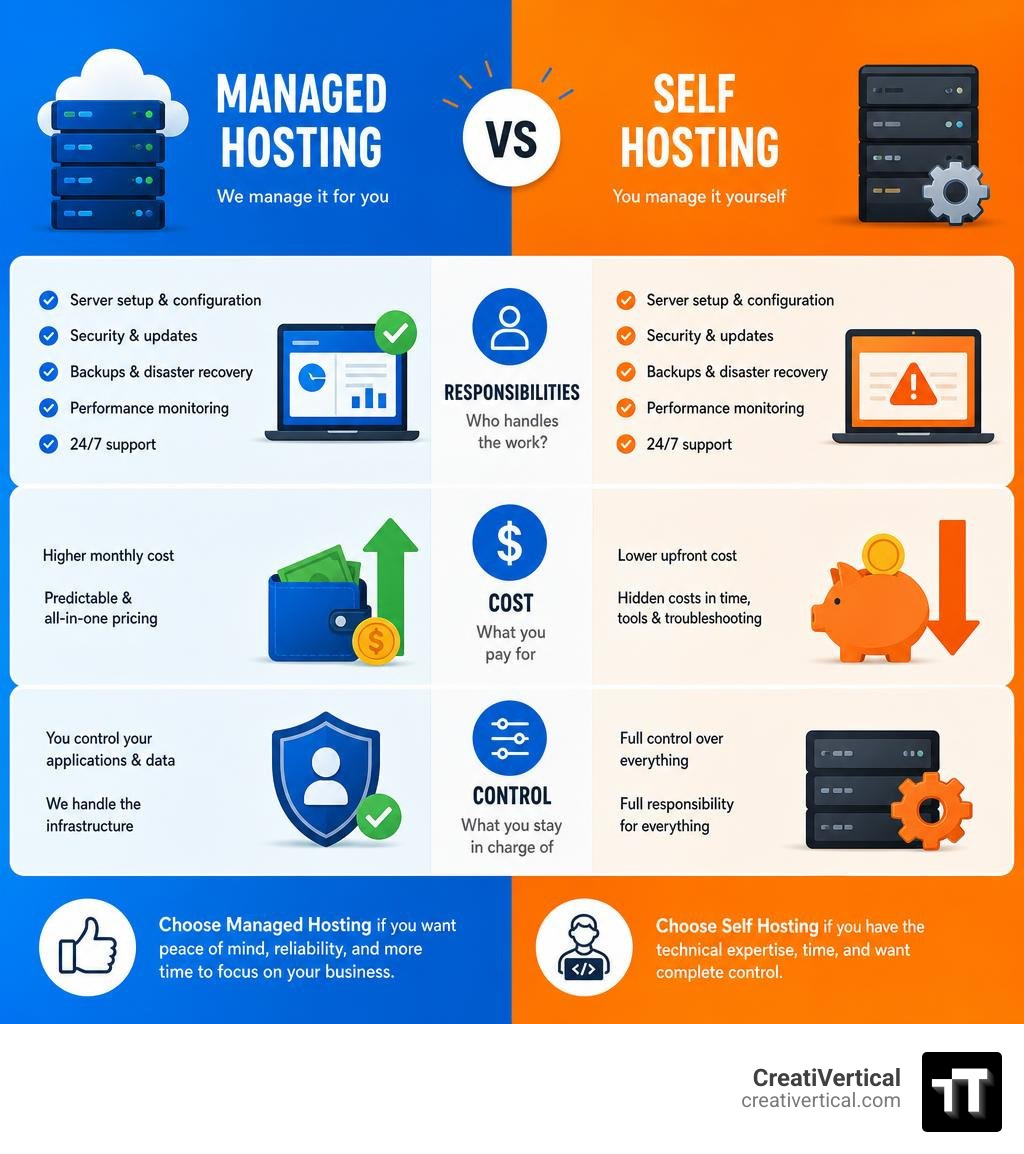
The core tradeoff is simple: you pay more upfront, and you get your time back. Instead of managing servers, patching vulnerabilities, and responding to outages yourself, a managed hosting provider handles all of that. You keep control over your application and content. They keep the lights on underneath.
This matters more than most businesses realize. A server that goes down at the wrong moment — during a product launch, a busy sales day, or a compliance audit — doesn’t just cost you traffic. It costs you credibility. And for a small team without dedicated IT staff, the hidden cost of managing infrastructure yourself often exceeds what managed hosting would have charged.
That’s the decision this guide will help you make clearly.
I’m Nicholas Cunha, founder of CreatiVertical, and over more than twenty years of agency work — including building web infrastructure for government bodies and institutions in the British Virgin Islands — I’ve seen how the right managed hosting setup can be the difference between a site that quietly supports your business and one that quietly undermines it. This guide walks you through everything you need to evaluate, choose, and migrate to a managed hosting solution with confidence.
Demystifying Managed Hosting: Core Definitions and Key Differences
To understand whether managed hosting is right for your business, it helps to look at how it compares to other common hosting models. Many businesses buy more infrastructure than they need, or worse, purchase unmanaged servers thinking they are getting a great deal, only to realize they lack the internal engineering hours to maintain them.
Managed vs. Unmanaged Hosting
In an unmanaged hosting model, the provider is only responsible for the physical hardware, power, and network connection. Once they hand over the login credentials, the operating system, security, web server configuration, backups, and software updates are entirely your responsibility. If a database corrupts at 3:00 AM, your internal team has to fix it.
With managed hosting, the provider assumes responsibility for the day-to-day operational health of the server environment. This includes proactive monitoring, patching, and immediate troubleshooting when things go wrong.
Managed vs. Dedicated Hosting
Dedicated hosting simply means you are renting an entire physical server that is not shared with any other tenant. It is a hardware specification. Managed hosting, on the other hand, is a service specification. You can have an unmanaged dedicated server, or you can have a fully managed dedicated server. When combined, managed dedicated hosting gives you the ultimate level of performance, tenant isolation, and security, alongside professional hands-on management.
Managed vs. Cloud Hosting
Cloud hosting relies on virtualized resources spread across multiple physical servers. While highly scalable, public clouds are notoriously complex to configure and secure. Standard cloud hosting is typically unmanaged, leaving you to deal with complicated virtual networking, storage allocations, and security groups. Managed cloud hosting bridges this gap by layering expert systems administration over the top of scalable cloud resources, giving you predictable performance without the management headaches.
Managed vs. Colocation
Colocation is the most hands-off model for a provider. You buy and own your own physical server hardware, and you rent space, power, cooling, and bandwidth inside a secure data center. You are still completely responsible for maintaining both the physical hardware and the software running on it. Managed hosting eliminates the capital expense of buying hardware entirely, as you rent the infrastructure and the management services together.
If you are currently evaluating options across our home state, you can find a comprehensive local breakdown in the Web Hosting Directory by US States: Missouri.
The Operational Reality: Provider Responsibilities vs. Client Control
When you transition to a managed hosting environment, you are establishing a partnership built on a clear division of labor. Understanding exactly where the provider’s responsibilities end and your team’s control begins is critical to avoiding operational gaps.

What the Provider Handles
A reputable managed hosting provider assumes full ownership of the underlying infrastructure, including:
- Server Setup and Configuration: Provisioning the hardware or virtual machines, installing the operating system, and optimizing the web server (such as Nginx or Apache) and database engines for your specific workloads.
- Continuous Security Patching: Proactively applying operating system patches and fireproofing the server against newly discovered vulnerabilities.
- Automated Backups: Implementing nightly backup schedules with secure off-site storage and clear retention policies, ensuring you can restore your systems with a single click if disaster strikes.
- Performance Monitoring: Watching server resource usage (CPU, RAM, disk I/O) around the clock to catch bottlenecks before they impact your users.
- 24/7/365 Technical Support: Providing rapid access to systems engineers who can diagnose and resolve complex environment issues at any hour.
For a deeper dive into how these layers protect your digital assets, explore our guide on Website Hosting Security.

What the Client Controls
By offloading the infrastructure layer, your team retains control over what actually drives your business:
- Application Code and Content: You remain responsible for your website’s codebase, database content, and user-facing assets.
- High-Level Configurations: While the provider manages the server, you retain the authority to define user access levels, application workflows, and business logic.
- Strategic Growth: Instead of spending weekends troubleshooting database locks, your developers can focus on building features, improving user experience, and driving revenue.
Evaluating the Business Case: Pros, Cons, and Cost Models
Making the shift to managed hosting requires a clear-eyed look at the financial and operational trade-offs. It is rarely just a question of comparing monthly hosting bills; you must calculate the total cost of ownership (TCO).
The Advantages
- Reduced Operational Overhead: You don’t need to hire a full-time systems administrator or pull your developers away from high-value projects to run server updates.
- Predictable Subscription Pricing: Instead of unpredictable billing spikes common in public clouds, managed hosting typically operates on a flat, predictable monthly fee that includes resources, bandwidth, and support.
- Enterprise-Grade Infrastructure: Access highly resilient networks, redundant power systems, and advanced threat detection that would be cost-prohibitive to build in-house.
- Rapid Scalability: When your traffic spikes, your provider can quickly scale your resources without downtime.
The Disadvantages
- Higher Headline Cost: The initial monthly fee for managed hosting is higher than a bare-bones, unmanaged server.
- Less Low-Level Control: Because the provider guarantees system stability and security, you may have limited root access or restricted ability to install non-standard, unapproved software packages.
Cost Comparison: Managed vs. Unmanaged Hosting
To illustrate the true financial impact, let’s look at a typical market comparison for a growing mid-sized business over a single year:
| Expense Category | Unmanaged Hosting (DIY) | Managed Hosting (Partnered) |
|---|---|---|
| Monthly Hosting Fee | $20–$50 / month | $150–$400 / month |
| In-House IT Labor (Maintenance & Updates) | ~10 hours/month ($500 value) | $0 (Included) |
| Emergency Outage Resolution | Variable ($150+/hour consultant fees) | $0 (Included) |
| Backup Storage & Security Licensing | $30 / month | $0 (Included) |
| Estimated Annual TCO | $6,500+ | $1,800–$4,800 |
While unmanaged hosting looks cheaper on paper, the hidden costs of internal labor, licensing, and emergency support quickly make it the more expensive option for active businesses.
How to Choose the Right Managed Hosting Provider
Selecting a provider is more than comparing RAM and CPU cores. You are choosing a critical operational partner. To protect your business, you must evaluate their performance guarantees, technical depth, and security frameworks.
Key SLA Metrics for Managed Hosting
A Service Level Agreement (SLA) is a legally binding commitment of performance. Do not accept vague promises. Look for:
- Uptime Guarantees: Look for providers offering at least a 99.9% uptime guarantee, with enterprise-grade networks scaling up to 99.999% uptime.
- Response Time Guarantees: Ensure the SLA specifies response times for critical (under 15-30 minutes), major, and minor issues.
- Escalation Procedures: The SLA should clearly outline how issues are escalated to senior engineers if a problem isn’t resolved quickly.
- Hardware Replacement: For dedicated setups, look for a guaranteed window (e.g., 4 hours) for replacing faulty hardware components.
Security and Compliance in Managed Hosting
If you operate in highly regulated spaces — such as government contracting, healthcare, or financial services — infrastructure compliance is non-negotiable.
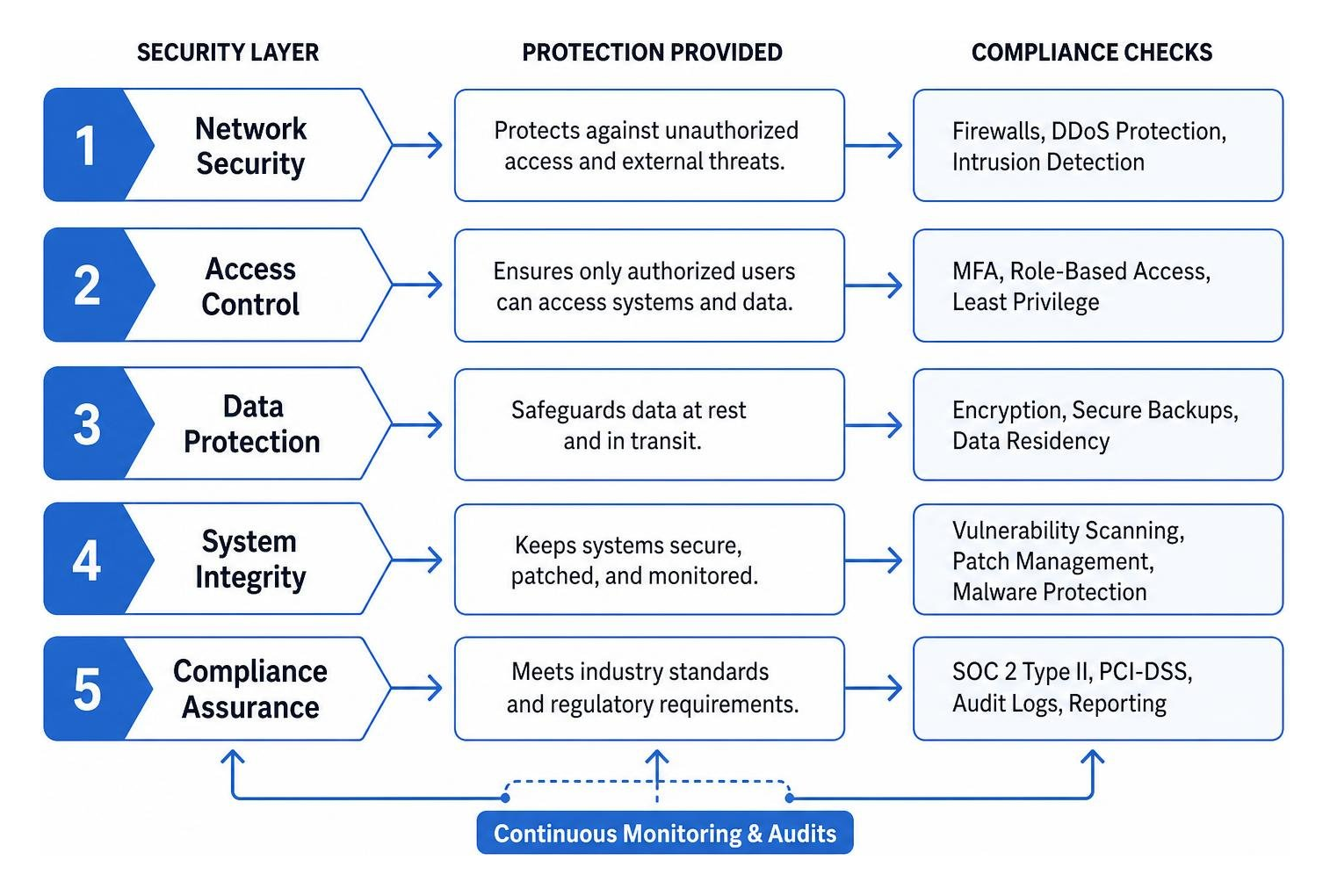
Verify that your provider maintains rigorous, independently audited standards:
- SOC 2 Type II: Confirms the provider has strict operational controls over security, availability, and processing integrity.
- PCI-DSS Compliance: Essential if you process, store, or transmit credit card data directly on your infrastructure.
- Data Residency: Confirm where your data physically lives to comply with local regulations and international privacy laws.
- Active Threat Detection: Ensure the environment includes enterprise-grade firewalls, continuous malware scanning, and robust DDoS mitigation.
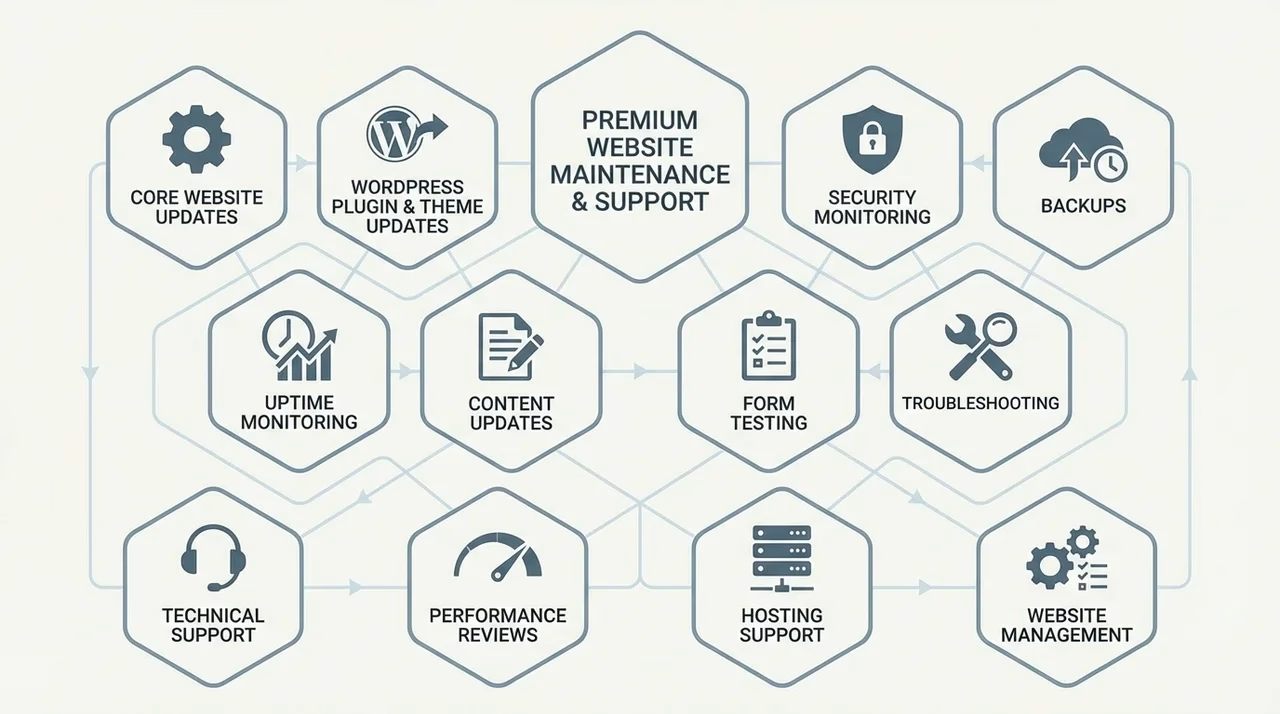
To understand how these protective layers fit into a broader maintenance strategy, review What Is Included in Our Website Maintenance and Support Service.
Migration, Onboarding, and Specialized Use Cases
The prospect of moving databases, email configurations, and legacy code to a new platform can feel daunting. However, a structured onboarding process minimizes risk and prevents downtime.
The Onboarding Journey
A professional migration follows a disciplined sequence:
- Assessment & Discovery: Auditing your current infrastructure, identifying software dependencies, and mapping database relationships.
- Target Architecture Design: Sizing your new environment correctly to handle your current traffic with room to grow.
- Parallel Testing: Building a staging clone of your site on the new managed server. This allows you to test performance, verify database integrity, and run security checks without affecting your live users.
- Scheduled Cutover: Executing the final synchronization of dynamic data (like recent database entries) and updating DNS records during off-peak hours to ensure a zero-downtime transition.
Tailoring to Your Business Model
Different organizations require distinct hosting architectures:
- SMBs & E-Commerce: Local businesses and growing online stores require high-speed caching, automated database optimization, and immediate scaling during promotional sales.
- Industrial Manufacturers: B2B manufacturers require highly secure environments to protect proprietary technical data, custom client portals, and legacy ERP system integrations.
- Government & Compliance-Heavy Vendors: Organizations working under frameworks like FISMA require isolated, single-tenant environments with strict audit trails and hardened operating systems.
If you are looking to connect with regional experts to discuss your infrastructure, you can locate us near the historic Lake Tapawingo Country Club at CreatiVertical – Lake Tapawingo, MO.
Frequently Asked Questions About Managed Infrastructure
Is managed hosting more expensive than unmanaged hosting?
Yes, the initial subscription price is higher because you are paying for both the physical hardware and the specialized human expertise required to maintain it. However, when you factor in the cost of hiring internal systems administrators, the time your developers spend troubleshooting server issues, and the direct revenue loss of unexpected downtime, managed hosting almost always delivers a lower total cost of ownership.
Can I migrate an existing website to a managed platform without downtime?
Absolutely. By utilizing a parallel testing methodology, your existing site remains fully operational on your old server while the new environment is built, configured, and tested. Once the new setup is verified, the final data sync and DNS update are performed, routing your visitors seamlessly to the faster, more secure platform with zero service interruption.
What is the difference between managed and dedicated hosting?
Dedicated hosting refers to the physical isolation of your hardware — you have an entire server all to yourself. Managed hosting refers to the service layer. You can purchase unmanaged dedicated hosting (where you get the hardware but must manage it yourself) or managed dedicated hosting (where you get exclusive physical hardware, and the provider’s engineering team handles the maintenance, security, and updates).
Conclusion: Fueling Your Digital Growth
At CreatiVertical, we don’t believe in treating your digital infrastructure as a series of disconnected, one-off projects. Your hosting environment is the bedrock upon which your entire business system rests. Whether you are running a local Kansas City business, managing highly sensitive offshore professional services, or operating as an industrial manufacturer, your systems must be fast, secure, and resilient.
By partnering with a team that understands how web design, SEO, and robust infrastructure work together, you transform your hosting from an administrative headache into a launchpad for growth.
Ready to offload the burden of server maintenance and secure your digital assets? Let’s chart a course forward together. Explore our Website Hosting Lead Management solutions or connect with our team for dedicated Website Maintenance Support in Kansas City to keep your systems running at peak performance.