

Why AI Workflow Automation Services Are Replacing Manual Processes in 2026
AI workflow automation services use artificial intelligence to handle repetitive, decision-heavy tasks — so your team stops doing work a machine can do better and faster.
Here’s a plain-English breakdown of what that means in practice:
| What it does | What that means for your business |
|---|---|
| Reads and routes unstructured data (emails, PDFs, forms) | No more manual sorting or data entry |
| Makes rule-based and judgment-based decisions automatically | Fewer bottlenecks waiting on human review |
| Connects your existing tools (CRM, ERP, Slack, email) | One workflow spans your whole stack |
| Learns and adapts as your process changes | Doesn’t break every time you update a form |
| Flags edge cases for human review | Keeps humans in the loop where it actually matters |
This is a different animal from the automation most businesses already have. Traditional automation moves data from Point A to Point B. AI automation understands the data first — then decides what to do with it.
The gap is significant. Most enterprise AI pilots never make it to production. The bottleneck isn’t the AI itself. It’s the distance between a working demo and a system that holds up in the real world — one that’s observable, maintainable, and actually connected to the tools your team uses every day.
That gap is exactly what this guide addresses.
We build and deploy secure, practical AI workflow automation services that connect your systems, clear your bottlenecks, and help your team focus on high-value work. This guide reflects what actually works in production, not what looks good in a sales deck.
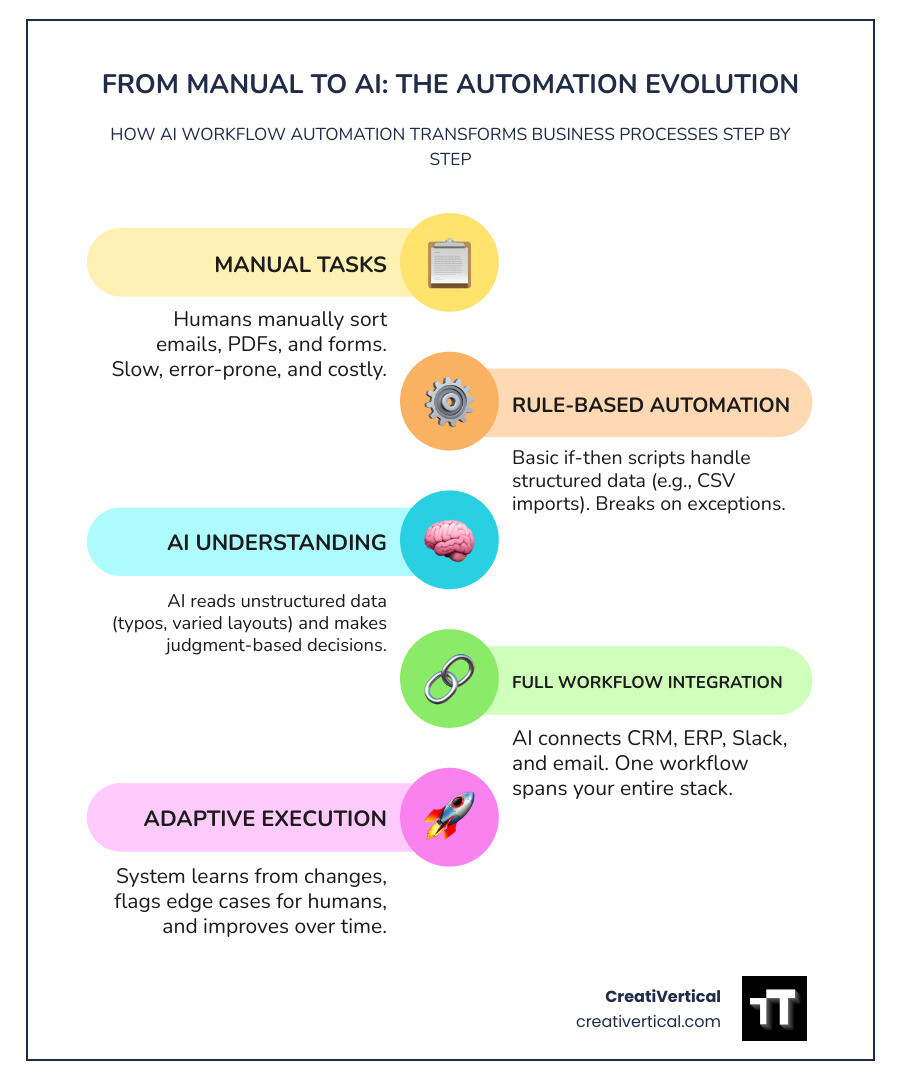
What is AI Workflow Automation? (Traditional vs. Cognitive)
Traditional automation relies on rigid, pre-programmed, “if-this-then-that” rules. It is excellent for predictable, structured tasks—like moving a clean CSV file from an email attachment into a database. However, the moment it encounters an unexpected variable, such as a slightly modified PDF layout or a typo in an email address, the script breaks. It has no capacity to reason.
AI-driven workflow automation introduces a cognitive layer to this process. Instead of hardcoded rules, it utilizes semantic routing and natural language processing to interpret the meaning behind data. It can read an unstructured email, understand that the sender is upset about a delayed shipment, extract the tracking number, verify the status in an ERP like SAP, and draft a contextually accurate reply—all without human intervention.
By leveraging Large Language Models (LLMs) and machine learning, cognitive automation handles exceptions gracefully. It classifies incoming files, extracts key parameters from messy documents, and makes judgment-based decisions that previously required manual triage.
Of course, introducing cognitive capabilities also means managing the quirks of modern LLMs. As we explore in our discussion on A Thought Experiment: When GPT-4 Acquires an Attitude, deploying these models in production requires robust guardrails to ensure they remain professional, predictable, and aligned with your business standards.
How AI Agents Differ from Traditional Bots
Traditional robotic process automation (RPA) bots are digital mimics. They replicate human keystrokes and follow a strict, linear path. If a button on a web portal moves three pixels to the left, the bot fails because its static rules no longer apply.
AI agents, by contrast, possess adaptive learning capabilities. Instead of following a rigid script, they are given an objective, a set of tools (such as APIs, search engines, and databases), and the autonomy to figure out the most efficient path to complete the task.
- Static Rules vs. Dynamic Planning: A bot can only execute paths you have explicitly mapped out. An agent can analyze a problem, plan a multi-step solution, execute it, and self-correct if it encounters an error.
- Exception Handling: When a bot hits an error, it stops and alerts an administrator. When an agent hits an error, it attempts to find an alternative route (e.g., trying a different search query or parsing a document using a different prompt template) before escalating.
- Contextual Awareness: Agents maintain state and memory over long processes, allowing them to make decisions based on historical interactions rather than just the immediate input.
However, even the most advanced agent is not a complete replacement for human judgment. As we highlight in Chatbots Are No Replacement for People, the most effective automation architectures use “mixed autonomy”—combining the speed of AI agents with structured human-in-the-loop (HITL) checkpoints to handle highly sensitive approvals and strategic decisions.
The Role of Generative and Agentic AI
In 2026, the automation landscape has shifted from simple text generation to fully agentic execution. Generative AI is no longer just drafting emails; it is writing code, generating custom database queries, and orchestrating complex tasks across disparate software systems.
Through natural language “vibe coding,” non-technical operations teams can describe a desired workflow in plain English, and an agentic platform will compile that description into an editable visual workflow graph. These agents do not work in isolation. By leveraging emerging technologies like the Model Context Protocol (MCP), agents can securely connect to local data repositories and communicate with other specialized agents.
To coordinate these complex interactions, teams are deploying shared memory stores. Platforms like One shared memory for your teammates, and agents allow humans and AI agents to access a unified, dynamically updated company brain, ensuring that your automated systems always operate with the most current operational context.
Key Benefits and ROI of AI Workflow Automation Services
Implementing AI workflow automation services is not about chasing a technology trend; it is about eliminating the silent margin killers in your business. Most teams spend up to half of their workweek on manual administrative tasks that require no creative thought—shuffling data between systems, drafting routine updates, and chasing internal approvals.
By automating these processes, businesses unlock immediate, compounding benefits:
- Massive Productivity Gains: Teams can scale their operational capacity without a linear increase in headcount. For example, a finance team can process a significantly higher volume of invoices without hiring additional staff.
- Near-Zero Error Rates: Human data entry is prone to fatigue and distraction. AI models, when properly grounded in your business data, extract and process information with consistent accuracy, preventing costly downstream billing and shipping mistakes.
- Accelerated Cycle Times: Processes that used to take days—such as client onboarding, contract analysis, or proposal drafting—are compressed into minutes, dramatically improving the customer experience.
These operational efficiencies also free up resources to focus on high-impact growth strategies. If you are looking to maximize your digital footprint, freeing your team from manual overhead allows you to invest more energy into advanced search strategies, which you can explore in our guide to the Best AI Tools for SEO 2025.
Measuring Success and Financial Return
To justify an investment in AI workflow automation, you must measure its return on investment (ROI) using hard business metrics rather than vague productivity promises.
While exact timelines and savings vary by organization, companies typically see a rapid recovery of their initial implementation costs and a substantial reduction in operational expenses for the automated workflow.
To calculate your potential return, focus on three primary metrics:
- Time Saved per Transaction: Multiply the hours saved per task by the average hourly rate of the employees performing it.
- Error Mitigation Savings: Calculate the historical cost of fixing manual data entry errors (e.g., expedited shipping fees, billing adjustments, compliance penalties) and measure the reduction in these incidents.
- Throughput Increase: Measure how many more transactions, leads, or client files your team can process in a given period.
To minimize risk, we recommend beginning with a pilot program targeting a single, high-volume, highly repetitive workflow. This allows you to prove the ROI in a controlled environment before committing to a full-scale rollout. For a broader look at how these efficiency trends are shaping the business landscape, check out our Digital Marketing Tips for 2025 Trends and Predictions.
Industry-Specific Use Cases: From Manufacturing to Offshore Law
Every industry has its own unique bottlenecks, compliance standards, and legacy systems. A generic, one-size-fits-all automation tool rarely solves the core operational challenges of a specialized business.
Whether you are running a factory floor, managing an offshore law firm, or marketing a hospitality brand, your automation strategy must be tailored to your specific environment. If you are in the service sector, for instance, you can find tailored strategies in our guide on Tips to Modernize Hospitality Marketing with AI.
Let’s examine how three distinct sectors are deploying custom AI workflows to transform their operations.
Industrial B2B Manufacturing and Logistics
In the industrial sector, operational delays directly impact the physical supply chain. Manufacturers and logistics providers use AI-powered workflows to synchronize their physical operations with their digital records.
- Predictive Maintenance & Minimizing Idle Time: By connecting IoT sensor data to AI workflows, systems can predict equipment failures before they occur. This predictive scheduling reduces idle time and prevents late deliveries.
- Defect Detection: Vision systems deployed on the factory floor identify product defects before items leave the warehouse, automating quality control and reducing waste.
- Supply Chain Management: Automated tracking and reordering systems monitor inventory levels in real-time, preventing the material shortages that typically halt production lines.
- Logistics & Route Optimization: AI-driven route optimization workflows analyze traffic, weather, and fuel data, resulting in lower fuel costs and significantly higher on-time delivery rates. Meanwhile, document extraction models eliminate the bulk of the manual entry required for bills of lading and customs documentation, accelerating throughput.
Offshore Professional Services and Fiduciary Firms
Offshore law firms and fiduciary providers operating in jurisdictions like the British Virgin Islands (BVI) and the Cayman Islands manage massive volumes of sensitive client documentation. Accuracy, speed, and strict compliance are paramount.
- Automated Document Routing & Triage: Incoming corporate filings, trust documents, and client communications are automatically classified, parsed, and routed to the correct legal team or partner. This significantly shrinks document turnaround times.
- Legal Research & Document Summarization: AI agents scan internal legal records, past case files, and jurisdictional regulations to draft concise summaries, allowing attorneys to focus on strategic advisory work.
- Compliance & KYC Checks: Automated workflows run background checks, verify corporate structures, and flag potential compliance risks against international AML (Anti-Money Laundering) databases.
To see a practical application of these technologies in the financial and legal sectors, explore our specialized case study on the AI Concierge for Financial Legal Services.
Government Contractors and FedRAMP Compliance
For government-facing technology vendors, security is not just a feature—it is a strict regulatory requirement. Operating under frameworks like FedRAMP and FISMA means that every automated workflow must adhere to rigorous data residency and access control standards.
- Secure Data Processing: AI workflows must ensure that federal data remains within authorized boundaries (such as AWS GovCloud or Azure Government) and is encrypted both in transit and at rest.
- Audit Trail Automation: Every automated action, decision, and system access is logged in an immutable audit ledger, simplifying compliance reporting and preparation for third-party assessment organizations (3PAOs).
- Vulnerability & Incident Response: AI agents continuously monitor system logs, classify security events, and initiate automated containment protocols if a potential threat is detected.
Navigating these strict security environments can be daunting. To learn how to implement these systems without overwhelming your compliance team, read our guide on How to Adopt FedRAMP Compliant AI Services Without Giving Your Security Officer a Panic Attack.
Evaluating the 2026 Low-Code Tool Landscape
The market for AI workflow automation tools has exploded, offering options that range from simple, drag-and-drop interfaces for solo creators to highly secure, extensible platforms designed for enterprise IT departments.
Choosing the right platform requires balancing ease of use against technical flexibility, pricing predictability, and security governance.
| Platform | Best For | Key Strength | Primary Limitation |
|---|---|---|---|
| n8n | Technical Teams & Developers | Source-available, self-hostable, highly customizable | Steeper learning curve for non-developers |
| Zapier | Non-Technical Business Users | Over 8,000 integrations, incredibly easy to set up | High cost at scale, limited advanced logic |
| Make | Visual Scenario Builders | Powerful data transformation, visually intuitive | UI can feel cluttered for complex workflows |
| Gumloop | Niche AI & Web Scraping | Native AI-blocks, excellent for data enrichment | Cluttered interface, credit-based pricing |
| Cassidy AI | Business Teams & Knowledge Management | Native RAG, multi-model selection per step | Less focus on legacy system integrations |
| MindStudio | No-Code AI Agents | Easy agent creation, multi-model routing | Restricted custom code capabilities |
Self-Serve Builders vs. Managed AI Workflow Automation Services
When adopting AI automation, businesses face a fundamental strategic decision: do you build and maintain these workflows yourself using self-serve tools, or do you partner with a managed service provider?
- Self-Serve Builders (e.g., Zapier, n8n, Make): These platforms are excellent if you have in-house technical resources who can dedicate time to building, testing, and debugging workflows. They offer immediate access and visual interfaces, but the burden of maintenance, API updates, and error handling falls entirely on your team.
- Managed AI Workflow Automation Services: For organizations that lack engineering bandwidth or operate in highly regulated industries, managed services are often the more viable path. A managed partner designs, integrates, tests, and maintains the workflows for you, providing guaranteed SLAs and manual fallback procedures if a critical system fails.
For teams looking for a middle ground—where AI agents operate with high autonomy but remain deeply integrated into your codebase—tools like Kaer — Work that ships itself represent the next generation of software-driven operational support.
Comparing Top Low-Code Platforms in 2026
If you decide to build internally, selecting the right low-code canvas is critical.
- Gumloop has emerged as a favorite for data-heavy workflows, particularly web scraping, content enrichment, and lead qualification. Its native AI blocks make it easy to feed live data directly into LLMs, minimizing hallucinations.
- Make remains a powerhouse for complex data transformations, allowing users to map and filter variables across multi-step scenarios with precise control.
- Cassidy AI focuses heavily on business teams, offering a drag-and-drop interface that makes it simple to build workflows grounded in your internal knowledge bases. It allows you to select the best LLM (such as Claude, GPT, or Gemini) for each specific step in a single workflow.
- MindStudio excels at creating specialized AI agents that can be deployed as web apps, browser extensions, or email-triggered assistants, making it highly accessible for teams focused on operational workflows.
As these tools become more powerful, the ability to instruct and configure them effectively is becoming a core business skill. To understand this shift, read about the Rising Demand for Prompt Engineers.
Security, Governance, and Deployment Best Practices
Deploying AI in a business environment requires strict adherence to security and governance standards. Passing sensitive client data, proprietary source code, or financial records through public LLMs without guardrails is a recipe for compliance failures and data leaks.
To deploy AI workflows safely, implement the following best practices:
- Enforce Data Privacy: Ensure your automation vendor or platform complies with regulations like SOC 2 Type II, GDPR, and HIPAA. Verify that your proprietary business data is encrypted both in transit and at rest, and that it is never used to train or fine-tune public AI models.
- Utilize Credential Vaults: Never hardcode API keys or OAuth tokens into your workflow steps. Use encrypted organizational vaults to mask credentials, allowing team members to run workflows without ever seeing the underlying access keys.
- Establish Human-in-the-Loop (HITL) Controls: For sensitive tasks—such as sending customer-facing emails, processing large financial transactions, or publishing public content—insert approval nodes that pause the workflow until a human reviews and signs off on the AI-generated output.
These governance principles apply across all digital touchpoints, including customer interactions and public feedback systems. For insights on managing public-facing AI deployments, see our guide on AI in Online Review Management.
Overcoming Deployment Challenges in AI Workflow Automation Services
The primary bottleneck in enterprise AI adoption is the gap between a working prototype and a maintainable, observable production system. Many enterprise-grade AI pilots struggle to reach production because teams run into integration blockers, unpredictable model costs, and silent workflow failures.
To overcome these challenges, we advise against trying to automate a process that is already broken. Redesign the workflow around how work actually moves, rather than simply digitizing a manual bottleneck.
Additionally, establish rigorous model evaluation and testing procedures. Before promoting a workflow update to production, run evaluations to measure how prompt or model changes impact output accuracy.
Finally, build your workflows with robust error-handling mechanisms (such as fallback models and automated alerts) to ensure that if a primary API fails, your operations continue uninterrupted. For a deeper look at optimizing your broader digital infrastructure, explore our Adaptive SEO Services.
Frequently Asked Questions About AI Automation
How quickly can AI workflow automation be implemented?
Simple AI workflows—such as automating lead routing, document classification, or standard email triage—can typically be designed, tested, and live in production within a matter of weeks.
More complex, enterprise-grade systems that require deep integration with legacy databases, custom API development, or strict compliance reviews generally take a few months. We recommend starting with a tightly scoped pilot program to prove value and refine the system before scaling.
Can AI integrate with legacy systems like SAP or Oracle?
Yes. Modern AI workflow platforms can connect with legacy ERPs, CRMs, and databases through secure APIs, database connectors, or custom middleware.
During the implementation phase, these integrations run in parallel with your current operations to ensure there is zero disruption to your daily business. The final cutover to the automated system is executed in managed stages after thorough testing.
Is our proprietary business data safe from model training?
When using enterprise-grade AI workflow automation services, your data is completely secure.
By utilizing enterprise API agreements and compliant platforms (such as SOC 2 and GDPR-compliant systems), your proprietary business data, client records, and communications are encrypted and processed in isolated environments. They are never used by model providers (like OpenAI, Anthropic, or Google) to train or fine-tune public models.
Conclusion
AI workflow automation is no longer a futuristic luxury; it is a fundamental operational necessity for businesses looking to scale efficiently. By replacing slow, error-prone manual tasks with intelligent, adaptive workflows, you free your team to focus on the high-value strategic work that actually drives growth. Think of it as fueling your operational engine so you can chart a clear course for expansion.
At CreatiVertical, we don’t just build websites or run marketing campaigns; we act as your ongoing growth partner, delivering complete, performance-focused digital systems. Through our applied AI enablement services, we help Kansas City local businesses, offshore professional service firms, industrial B2B manufacturers, and government contractors design and deploy secure workflow automations that deliver measurable business results.
Ready to eliminate your operational bottlenecks and scale your business? Explore our Professional Web Design Services in Kansas City and let’s discuss how we can build a high-performance digital system tailored to your goals.