

What FedRAMP Compliance Web Design Actually Requires (And Why It Matters)
FedRAMP compliance web design is the practice of building websites and digital platforms for cloud service providers (CSPs) that meet the Federal Risk and Authorization Management Program’s security, accessibility, and documentation standards — so federal agencies can trust and procure those services.
If you’re trying to get oriented fast, here’s the short version:
- FedRAMP is a U.S. government program that standardizes how cloud products are assessed and authorized for federal use
- Web design for FedRAMP means your public site, service portal, and trust center must reflect and support your security posture — not contradict it
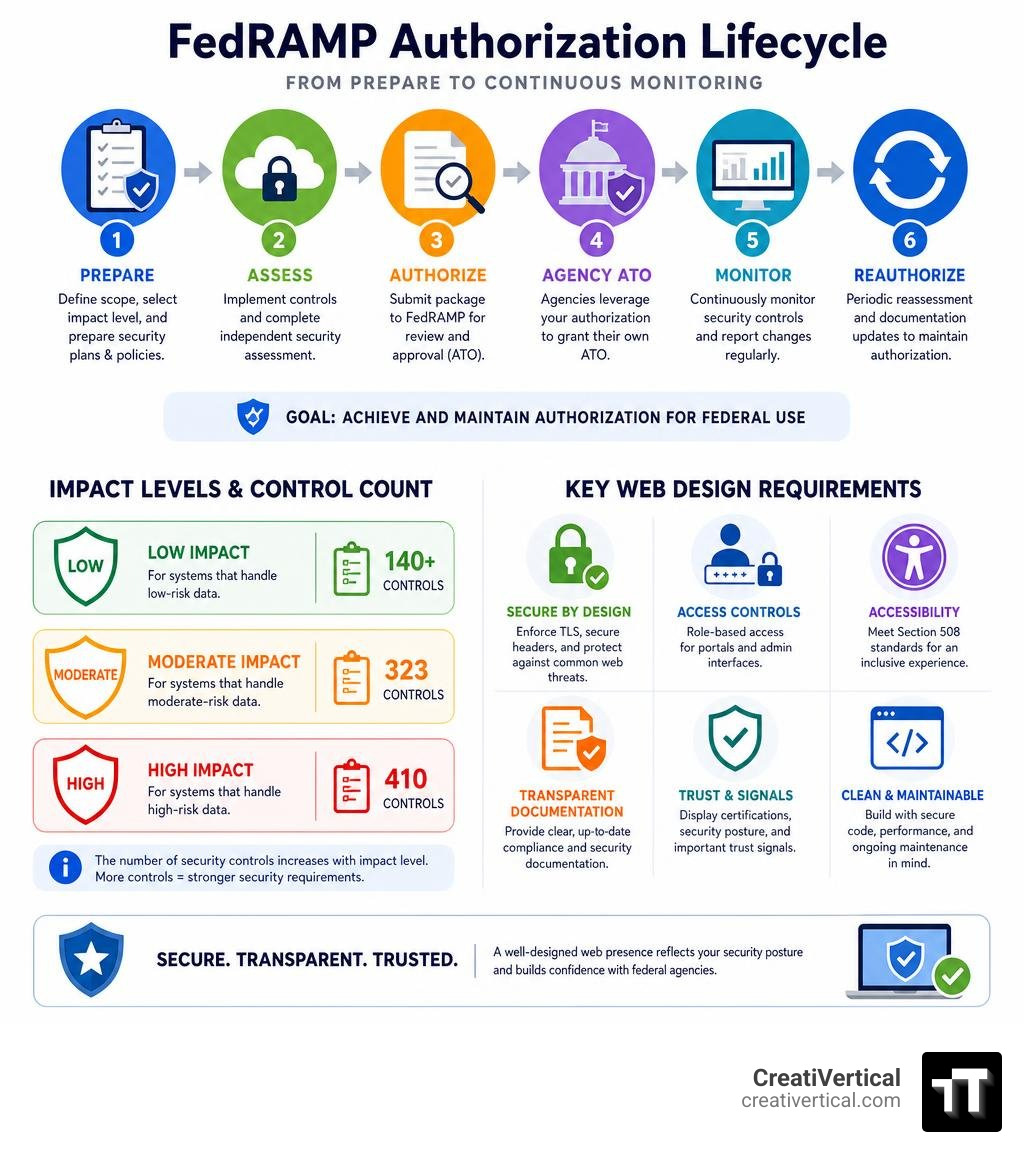
- Key requirements touch TLS enforcement, access controls, Section 508 accessibility, NIST SP 800-53 security controls, and public-facing compliance documentation
- Impact level matters — Moderate authorization requires roughly 323 controls; High requires roughly 410
- FedRAMP 20x (launched in March 2025) is modernizing the authorization process with automation and programmatic data sharing, which directly affects how CSPs structure their public compliance pages
There are currently 526 FedRAMP-authorized services listed in the FedRAMP Marketplace. Getting there — and staying there — requires more than a good security program. It requires a web presence built to support it.
That’s what this guide covers.
I’m Nicholas Cunha, founder of CreatiVertical, with over twenty years of agency and project work that includes building web platforms for government and institutional clients — experience that directly informs how I approach FedRAMP compliance web design for government-facing technology vendors. This guide pulls from that work, along with current FedRAMP program documentation, to give you a practical, decision-ready resource.
Understanding FedRAMP and Its Impact on Web Architecture
The Federal Risk and Authorization Management Program (FedRAMP) is a government-wide program managed by the General Services Administration (GSA). Its core goal is simple: standardize security assessments, authorizations, and continuous monitoring for cloud products and services used by federal agencies.
Before a federal agency can adopt any cloud service, that service must obtain an Authority to Operate (ATO). Historically, every agency performed its own security assessments. FedRAMP changed this by introducing a “do once, use many times” framework. Once a cloud service provider (CSP) achieves authorization, any federal agency can leverage that existing security package to grant its own ATO, saving millions of dollars and months of administrative friction. You can learn more about this standardizing framework through the FedRAMP – GSA resource.
But how does this affect web architecture?
If your cloud service relies on a web interface, customer portal, or public-facing marketing site, those digital front doors are in-scope. They are the primary targets for external threats and the first touchpoints for federal procurement officers. If your web design is insecure, lacks proper access controls, or relies on unvetted third-party scripts, your entire authorization boundary is compromised.
When we approach modern Website Development, we must treat web design as an extension of the system security boundary. This means your front-end architecture, your content management system (CMS), and your public-facing trust centers must be designed with security baked into the very first line of code.
The Core Requirements of FedRAMP Compliance Web Design
When building a website or web application that aligns with FedRAMP, your design decisions must support robust front-end security and secure data transmission. Every form field, API call, and user session must be engineered to prevent data leakage and unauthorized access.
A comprehensive overview of these security expectations is detailed in the FedRAMP Compliance & Certification | Why It Is Important – Kiteworks guide. In practical terms, web designers and developers must address several core areas:
- Boundary Definition: You must clearly define what parts of your web presence sit inside the FedRAMP authorization boundary (where federal data is processed) and what sits outside (such as your public marketing site).
- Data in Transit: All data transmitted to and from your web application must be encrypted. There is no room for mixed-content warnings or legacy protocols.
- Session Management: User sessions must be strictly managed, with automated timeouts, secure cookie flags, and robust protection against session hijacking.
- Input Validation: Front-end forms must use strict validation to prevent cross-site scripting (XSS) and SQL injection attacks.
For businesses looking to build a compliant front-end that speaks directly to government buyers, working with a specialized team that understands federal expectations is critical. If you are looking for localized expertise, exploring Website Design in KC can help you find partners who know how to balance beautiful user experiences with rigid federal compliance baselines.
Technical Security Controls for FedRAMP-Compliant Web Development
Building a secure website is not about choosing a pretty template; it is about engineering a secure system. Several key technical controls must be integrated directly into your web development workflow.
First, Transport Layer Security (TLS) enforcement is mandatory. You must enforce TLS 1.2 or TLS 1.3 across your entire web application. Any attempt to access the site via unencrypted HTTP must be immediately redirected to HTTPS, and HTTP Strict Transport Security (HSTS) headers must be implemented to ensure browsers only connect securely.
Second, Multi-Factor Authentication (MFA) and Single Sign-On (SSO) are non-negotiable for administrative and user portals. Your front-end design must gracefully accommodate MFA challenges without degrading the user experience. Integrating with federal identity providers via SAML or OpenID Connect ensures that identity assertion is handled securely outside of your local database.
Third, Role-Based Access Control (RBAC) must be built into the user interface. Users should only see the tools, pages, and data fields they are explicitly authorized to access.
When executing these complex integrations, partnering with an agency that offers Professional Web Design Services in Kansas City ensures your technical stack is configured correctly from day one.
Mapping NIST SP 800-53 Controls to Front-End Design
The security controls required by FedRAMP are derived from the National Institute of Standards and Technology (NIST) Special Publication 800-53. While many of these controls apply to physical security and cloud infrastructure, several families directly impact front-end web design and development:
- Access Control (AC): Enforces account management, session termination, and concurrent session limits. Your web design must handle automatic logouts gracefully, notifying the user before their session expires.
- Identification and Authentication (IA): Governs how users log in, password complexity rules, and MFA interfaces.
- System and Communications Protection (SC): Requires secure name resolution (DNSSEC), cryptographic key management, and separation of user interfaces from system management functions.
- System and Information Integrity (SI): Focuses on flaw remediation, input validation, and error handling. Your website should never display detailed system error messages to public users, as these can expose underlying database structures to attackers.
- Audit and Accountability (AU): Dictates that all user activities, especially administrative changes, must generate detailed audit logs.
To satisfy these controls, we recommend using source-controlled templates and strict version tracking to ensure complete traceability of all code changes. Additionally, dependency vetting must be performed continuously. Modern websites rely heavily on third-party JavaScript libraries, frameworks, and plugins. If one of these dependencies contains a vulnerability, your entire site is at risk. Regular vulnerability scanning of both the code and the hosting environment is essential to maintain your compliance posture.
Navigating Impact Levels: FedRAMP Moderate vs. High in Web Applications
FedRAMP categorizes cloud systems into three primary impact levels: Low, Moderate, and High. These levels are based on the potential impact that a loss of confidentiality, integrity, or availability would have on an agency’s operations and assets.
For web applications, the difference between these levels dictates how rigidly you must lock down your front-end and back-end architectures.
| Impact Level | Security Controls | Target Use Case | Web Application Implications |
|---|---|---|---|
| LI-SaaS | 50+ Controls | Low-risk SaaS apps without PII (except basic login) | Simple tools, basic informational portals, minimal data capture. |
| Low | ~156 Controls | Low-risk systems where data loss is inconvenient but not disruptive | Standard public-facing sites, basic interactive tools, no sensitive data. |
| Moderate | ~323 Controls | Systems handling controlled unclassified info (CUI) | Most enterprise SaaS platforms. Requires robust MFA, RBAC, and detailed audit logging. |
| High | ~410 Controls | Systems handling highly sensitive government data (e.g., law enforcement, healthcare) | Requires dedicated, hardened enclaves, continuous monitoring, and strict physical and logical isolation. |
Infrastructure and Hosting Considerations for FedRAMP Compliance Web Design
Your web design is only as secure as the infrastructure it sits on. You cannot achieve FedRAMP compliance by hosting a secure website on a standard, unvetted commercial server.
For systems requiring Moderate or High authorizations, you must deploy your web applications within a FedRAMP-authorized cloud environment. Amazon Web Services (AWS) is a common choice for government contractors. AWS US East-West regions hold a Joint Authorization Board (JAB) Provisional Authority-to-Operate (P-ATO) for the Moderate impact level, making it suitable for most standard enterprise portals. For High impact workloads, AWS GovCloud (US) provides the necessary physical and logical isolation to meet strict federal mandates.
When evaluating your current setup, it is helpful to look at the big picture of your digital footprint. If you are wondering how your hosting environment, load speeds, and overall architecture measure up, reviewing our guide on How to Improve a Website can give you a starting point for aligning your commercial assets with more rigorous security standards.
The Intersection of Accessibility and Security: Section 508 and WCAG
A common pitfall in federal web design is treating accessibility and security as two separate goals. In the federal space, they are legally intertwined.
Under the Revised Section 508 of the Rehabilitation Act, all federal agencies and their contractors must ensure that their digital products are accessible to people with disabilities. This standard is heavily mapped to the Web Content Accessibility Guidelines (WCAG) 2.1 AA. If you build a incredibly secure, FedRAMP-authorized web portal that a disabled federal employee cannot navigate, your platform is non-compliant.
You can study the complete framework for these requirements using the Guide to Accessible Web Design & Development | Section508.gov resource.
From a design perspective, this means:
- Ensuring text and interactive elements exceed minimum contrast ratios (at least 4.5:1 for standard text)
- Making sure every interactive element is fully navigable via a keyboard (no keyboard traps)
- Providing clear, visible focus indicators so keyboard users know where they are on a page
- Using descriptive link text instead of vague phrases like “click here”
When building on popular content management systems, you need a development partner who designs with these standards from the very first wireframe. If you are utilizing open-source platforms, choosing a team experienced in WordPress Web Design in Kansas City will ensure your theme and plugin architecture are built to support both Section 508 compliance and secure, hardened hosting environments.
Federal Web Design Mandates and the USWDS
The visual and structural expectations for federal web design are constantly evolving. For instance, the Executive Order, “America by Design,” signed in 2026, mandated significant improvements to federal web design to enhance usability, consistency, and accessibility across all public-facing federal websites. You can read the detailed coverage of this initiative in the Trump targets federal web design in new executive order | FedScoop article.
Historically, less than 20% of federal websites have utilized the standard U.S. Web Design System (USWDS) code, and only 6% have achieved a “good” rating for mobile performance. The establishment of the National Design Studio and the push for unified USWDS adoption aim to correct this.
For contractors and CSPs, aligning your user interfaces with the USWDS design tokens, components, and layout patterns is a smart strategic move. It makes your platform feel familiar and trustworthy to federal users, reduces duplicative design costs, and ensures your application meets the high-performance mobile metrics now expected by federal procurement teams.
Designing FedRAMP-Compatible Trust Centers and Public Documentation
To win federal contracts, you must make it easy for agency buyers and security officers to verify your compliance status. This is where a public-facing “Trust Center” or compliance directory comes in.

Under the latest FedRAMP program guidelines, providers must share their certification data in a structured, transparent manner. The Certification Data Sharing – FedRAMP Consolidated Rules for 2026 Public Preview rules outline several strict requirements for how this information must be displayed and managed:
- Always Include Your FedRAMP ID: Your unique FedRAMP ID must be clearly displayed on all public certification pages so agencies can easily cross-reference your status in the official Marketplace.
- Dual Formats: Your certification data, service lists, and policy summaries must be available in both a human-readable format (for procurement officers) and a machine-readable JSON format (for automated compliance tracking).
- Access Logging: If you gate access to detailed security packages or documentation, your trust center must maintain detailed access logs for at least six months.
- Historical Data: You must maintain and make available historical certification data for at least three years, consolidated on a quarterly basis.
By designing your public trust center to meet these standards, you demonstrate to buyers that your organization operates with absolute transparency and technical discipline.
Frequently Asked Questions about FedRAMP Compliance Web Design
How does FedRAMP 20x affect web design and compliance requirements?
FedRAMP 20x is a modernizing initiative designed to automate the compliance lifecycle and speed up authorization timelines. For web design, this means a heavy shift toward programmatic access and automation.
Instead of relying on static PDFs and manual spreadsheets, CSPs must now provide their security controls and system documentation in digital, machine-readable formats. Public-facing trust centers must be designed to support API-driven data sharing, allowing federal compliance tools to pull real-time security postures directly from your web platform. You can monitor ongoing updates regarding these automation efforts on the official FedRAMP | FedRAMP.gov portal.
Can we use WordPress for a FedRAMP-compliant website?
Yes, but with an important caveat: WordPress itself is not FedRAMP authorized.
To use WordPress for a compliant public site or portal, you must deploy it on a FedRAMP-authorized hosting platform, such as WP Engine GovCloud, Pantheon, or Cloudflare for Government. Additionally, you must strictly limit and vet all third-party plugins, enforce rigid MFA and SSO for administrative access, and implement continuous vulnerability scanning.
Maintaining this level of security requires ongoing vigilance. Utilizing professional Website Maintenance Support in Kansas City ensures your CMS, plugins, and custom code are constantly updated, patched, and monitored against emerging threats.
How long is a FedRAMP Ready designation valid on the Marketplace?
A FedRAMP Ready designation is valid on the FedRAMP Marketplace for exactly twelve months.
To achieve this designation, a CSP must undergo a formal readiness assessment by an accredited Third-Party Assessment Organization (3PAO) and submit a Readiness Assessment Report (RAR). If the CSP does not secure an agency sponsor or Joint Authorization Board (JAB) review within those twelve months, the designation expires, and they must undergo a reassessment to maintain their listing.
Conclusion
Navigating the intersection of web design, accessibility, and federal security compliance is a complex journey. In the public sector, your website is not just a marketing tool; it is a critical component of your security posture. A single unvetted script or an inaccessible form can stall your authorization or disqualify you from a lucrative federal contract.
At CreatiVertical, we operate as a complete, performance-focused growth partner. Based in Kansas City, Missouri, we specialize in building secure, compliant, and highly accessible digital systems for government-facing technology vendors. We don’t just deliver one-off design projects; we engineer secure web presences, optimize them for search and AI visibility, and maintain them to the highest technical standards.
If you are ready to build a web presence that earns federal trust and satisfies the most rigid security baselines, let’s talk.